Istio Part 3-2: Partially Enrolled Pods and the Untaint Controller
The original version of this post is available on the Channel.io Tech Blog.
Hi, this is Dylan and Jetty (Jaehong Jung) from the Channel.io DevOps team.
This is Part 3-2 of our Istio Ambient mode adoption series. In Part 1, while explaining Ambient mode traffic redirection, we mentioned that ztunnel and istio-cni must always be running. At the time, we only briefly noted that if a Pod is scheduled before istio-cni is ready, that Pod may participate in the mesh only incompletely. In this post, we unpack that sentence in more detail.
- Part 1: Why Istio Ambient Mode?
- Part 2: Ambient Mode Under the Hood via Envoy Configs
- Part 3: Surprising Issues and Troubleshooting in Production
- Part 3-1: 503 and Half-open Connections
- Part 3-2: Partially Enrolled Pods and the Untaint Controller (this post)
- Part 3-3: Safely Upgrading Ambient Mode
- Part 3-4: Detecting 507 Status Codes and istiod Disconnections
The Istio team also treats ztunnel and istio-cni as critical components in Ambient mode. In particular, the istio-cni node agent is required in Ambient mode because it configures traffic redirection for workload Pods. These components therefore need to be ready at all times.
The issue in this post starts from that assumption. From Kubernetes’ perspective, a Pod may be Running and its readiness probe may be passing. From the Ambient mesh perspective, however, that workload Pod may still be incomplete depending on the state of ztunnel and istio-cni. In this post, I will broadly call this class of issues partially enrolled Pods.
Before We Start: What It Means for a Pod to Join the Mesh
In Ambient mode, a workload Pod joining the mesh does not simply mean that its namespace has the istio.io/dataplane-mode=ambient label. That label is closer to an intent or marker saying that the Pod should be part of the Ambient mesh. For traffic to actually pass through ztunnel, node-local components need to prepare the Pod’s network.
sequenceDiagram
    participant K as kubelet / CNI chain
    participant P as istio-cni plugin
    participant A as istio-cni node agent
    participant Z as ztunnel
    participant Pod as workload Pod
    participant API as Kubernetes API

    K->>P: CmdAdd(pod netns, pod IP)
    P->>API: Check whether Pod is ambient
    P->>A: Send CNI add event<br />(UDS: pluginevent.sock)
    A->>Pod: Enter pod netns<br />configure iptables/nftables redirection
    A->>Z: Send AddWorkload + netns FD<br />(UDS: ztunnel.sock)
    Z-->>A: ACK
    A->>API: ambient.istio.io/redirection=enabled
The important point is that istio-cni does more than inject iptables rules. The istio-cni node agent configures redirection rules inside the Pod network namespace, and it also passes the Pod’s workload information and network namespace file descriptor to ztunnel. Only then can ztunnel handle inbound and outbound traffic through that Pod’s socket.
For a Pod to fully participate in the Ambient mesh, two things need to complete together.
- Traffic redirection rules must be configured inside the Pod network namespace.
- ztunnel must recognize that Pod as a workload and be ready to proxy it.
If either piece is missing, there can be a window where the Pod looks normal to Kubernetes but is still incomplete from the mesh dataplane’s perspective.
1. The Problem
While rolling out Ambient mode in production, we saw intermittent cases where newly created Pods on certain nodes could not receive traffic. The Pods themselves were Running, their readiness probes passed, and they were correctly included in Kubernetes Service endpoints. But when other mesh workloads or waypoints sent traffic to those Pods, requests failed.
There were no meaningful errors in the application logs, and Pod readiness looked normal, so Kubernetes did not appear to see a problem. On the client side, however, we observed Envoy-style errors like this.
upstream connect error or disconnect/reset before headers
reset reason: connection failure
reset reason: connection termination
We covered 503 errors in Part 3-1, but this was a separate issue we encountered after the half-open connection problem. At first it looked like the same class of 503, but the observed error messages differed. In the half-open connection issue, the main message was upstream connect error or disconnect/reset before headers. This time, reset reasons such as connection failure and connection termination appeared as well. That made us suspect a different root cause from the stale connection reuse we had already analyzed.
To understand the issue, we need to recall how a waypoint sends traffic to a destination Pod. In Ambient mode, after a waypoint finishes L7 processing, it opens an upstream connection to the destination workload. In the normal path, the destination Pod’s redirection rules and node-local ztunnel handle that traffic.
But a Pod can be Ready from Kubernetes’ perspective while Pod redirection or ztunnel registration is not yet complete from the mesh dataplane’s perspective. To the client, this can look like an upstream connection failure rather than an application problem.
flowchart LR
    C["Client / another workload"]
    WP["waypoint<br />(Envoy)"]
    POD["destination Pod<br />Running / Ready"]
    ZT["ztunnel<br />node-local"]

    C --> WP
    WP -->|"upstream traffic"| POD
    POD -. "ambient redirection<br />or proxying incomplete" .-> ZT

    WP -. "connection refused / reset / timeout<br />503 through Envoy" .-> C

    style POD fill:#ffe0b2
    style ZT fill:#fff3cd
In one sentence: Kubernetes believes the Pod is ready, but the Ambient mesh is not yet ready to handle that Pod.
2. Partially Enrolled State in the Source Code
The flow above can be represented as the following diagram. The source code in this section is about the same steps: istio-cni enters the workload Pod’s network namespace, configures redirection rules, and tells ztunnel to create a workload proxy.
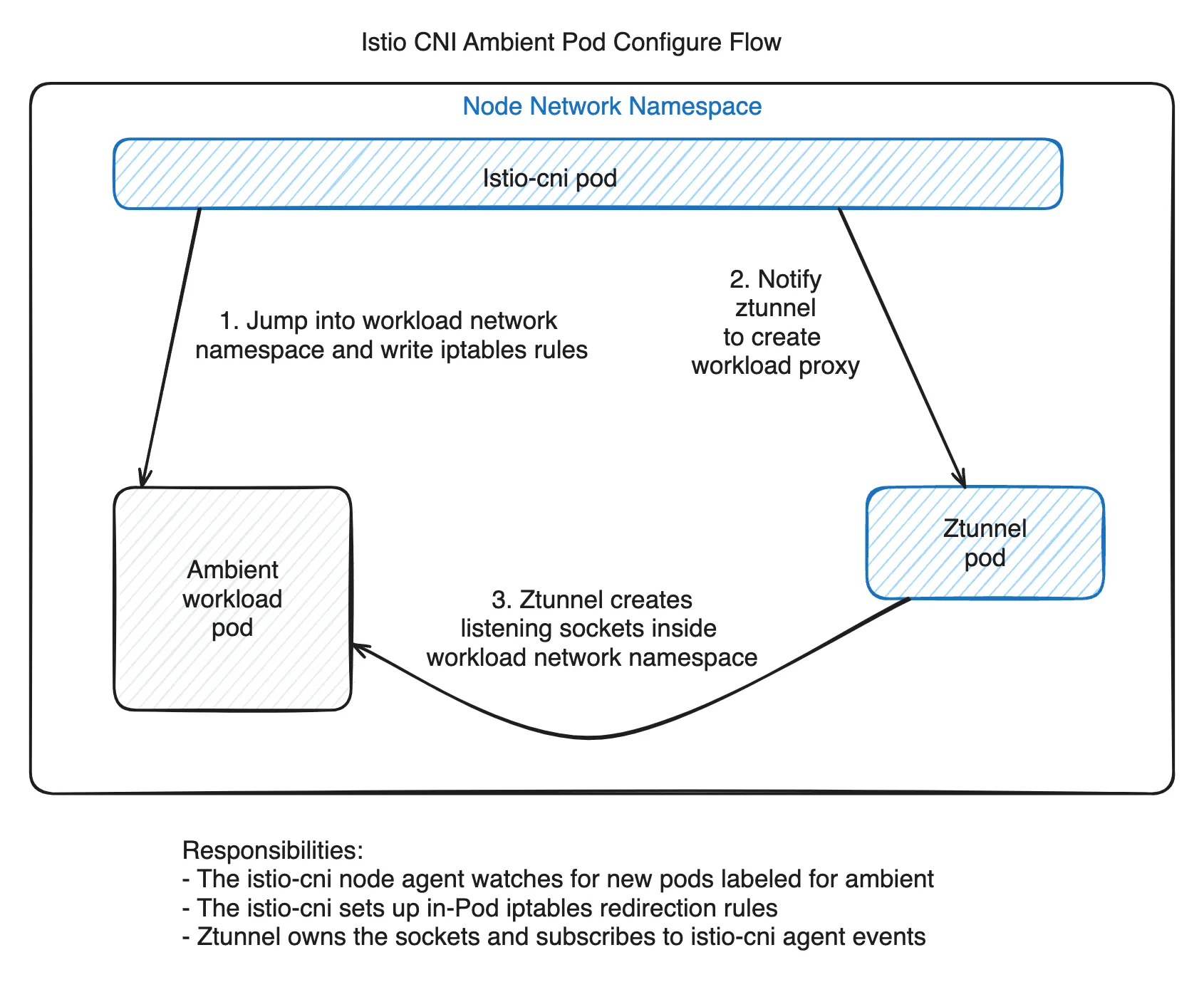
Looking at Istio source code, we can see that Ambient redirection state is tracked with a Pod annotation. The key annotation is ambient.istio.io/redirection. When the value is enabled, redirection has been configured and the Pod is captured. When the value is pending, some steps have completed, but ztunnel has not yet accepted the workload for proxying.
// pkg/config/constants/constants.go

AmbientRedirectionEnabled = "enabled"

// The presence of this annotation with this specific value indicates the pod is
// *partially* captured but no ztunnel has accepted it for proxying yet.
// Pods in this state will not egress/ingress traffic until an active ztunnel begins proxying them.
AmbientRedirectionPending = "pending"
Here, pending does not simply mean that the state is being updated slowly. As the comment says, ingress and egress traffic may not work until an active ztunnel begins proxying that Pod.
The path that adds a Pod to the mesh makes this clearer. AddPodToMesh in cni/pkg/nodeagent/meshdataplane_linux.go opens the Pod network namespace, creates in-pod redirection rules, and then sends workload information to ztunnel. If redirection succeeds but ztunnel registration fails, Istio annotates the Pod as pending.
// cni/pkg/nodeagent/meshdataplane_linux.go

if err := s.netServer.AddPodToMesh(ctx, pod, podIPs, netNs); err != nil {
    if errors.Is(err, ErrNonRetryableAdd) {
        return err
    }
    log.Error("failed to add pod to ztunnel: pod partially added, annotating with pending status")
    if err := util.AnnotatePartiallyEnrolledPod(s.kubeClient, &pod.ObjectMeta); err != nil {
        return err
    }
    return err
}

// ... after host ipset handling

if err := util.AnnotateEnrolledPod(s.kubeClient, &pod.ObjectMeta); err != nil {
    return err
}
One level deeper, netServer.AddPodToMesh works in this order. It first registers the Pod UID in the snapshot/cache, opens or finds the Pod network namespace, creates redirection rules inside the Pod netns, and finally sends an AddWorkload message to ztunnel.
// cni/pkg/nodeagent/net_linux.go

s.currentPodSnapshot.Ensure(string(pod.UID))
openNetns, err := s.getOrOpenNetns(pod, netNs)

// Create redirection rules inside the pod netns
s.trafficManager.CreateInpodRules(log, podCfg)

// Register workload with ztunnel
s.sendPodToZtunnelAndWaitForAck(ctx, pod, openNetns)
ztunnel registration happens in PodAdded. If there is no ztunnel connection yet, it returns a no ztunnel connection error.
// cni/pkg/nodeagent/ztunnelserver_linux.go

latestConn, err := z.conns.LatestConn()
if err != nil {
    return fmt.Errorf("no ztunnel connection")
}

add := &zdsapi.AddWorkload{
    WorkloadInfo: podToWorkload(pod),
    Uid:          uid,
}
In this case, redirection rules may already exist in the Pod netns, but ztunnel does not yet know about the Pod. Istio marks the Pod as pending and tries again later.
Not every failure leaves a pending annotation. If the CNI plugin was never called, or if ambient selection failed and the CNI event never reached the node agent, the redirection rules themselves may be missing. Conversely, if the CNI plugin determines that the Pod is ambient but fails to send the event to the node agent, the CNI ADD call returns an error. In the code, pending is closer to “redirection was partially applied, but ztunnel registration has not completed.”
3. Why Retry Alone Was Not Enough
Istio does not simply abandon Pods in the pending state. When processing Pod update events, it checks PodPartiallyEnrolled separately and treats such Pods as retry candidates.
// cni/pkg/nodeagent/informers.go

isEnrolled := util.PodFullyEnrolled(currentPod)
isPartiallyEnrolled := util.PodPartiallyEnrolled(currentPod)
shouldBeEnabled := s.enablementSelector.Matches(currentPod.Labels, currentPod.Annotations, ns.Labels)

changeNeeded := (isEnrolled != shouldBeEnabled) || isPartiallyEnrolled
In other words, a Pod in the pending state can trigger another AddPodToMesh attempt on a later event. If ztunnel connects later, the Pod may eventually reach the enabled state.
But operationally, relying on this retry path was not enough. Traffic can be lost before the retry succeeds. If the readiness probe only checks application readiness, the Pod can be included in Kubernetes Service endpoints while mesh traffic to it still fails.
There is also a policy concern. A Pod missing istio-cni redirection may bypass ztunnel, which means mTLS, AuthorizationPolicy, and telemetry may not apply. The Ambient Mesh documentation also notes that this can bypass Istio policy.
4. Why Partially Enrolled Pods Appear
The starting point is that the Kubernetes scheduler does not guarantee DaemonSet readiness as a prerequisite for scheduling regular workloads. When a new node joins a cluster, the istio-cni DaemonSet Pod, the ztunnel DaemonSet Pod, and regular workload Pods can all be scheduled at nearly the same time.
The order we want is this.
sequenceDiagram
    participant N as Node
    participant CNI as istio-cni DS
    participant ZT as ztunnel DS
    participant W as workload Pod

    N->>N: Node Ready
    CNI->>N: Scheduled / Running / Ready
    ZT->>N: Scheduled / Running / Ready
    W->>N: Scheduled
    W->>CNI: CNI event processed
    CNI->>ZT: AddWorkload ACK
    Note over W,ZT: Ambient enrollment complete
In reality, DaemonSet Pods and regular workload Pods can be scheduled almost simultaneously on a new node. If istio-cni has not yet been inserted into the CNI chain, or if ambient selection fails, the workload Pod may move to Running and Ready before mesh redirection is configured.
sequenceDiagram
    participant N as Node
    participant CNI as istio-cni DS
    participant ZT as ztunnel DS
    participant W as workload Pod

    N->>N: Node Ready
    CNI->>N: Scheduled<br />(config missing / API lookup may fail)
    ZT->>N: Scheduled<br />(not yet connected to CNI)
    W->>N: Scheduled
    W->>W: CNI chain runs
    Note over W,CNI: istio-cni not called<br />or ambient check failed
    W->>W: Running / Ready
    Note over W,CNI: no redirection rule<br />no enabled annotation
    CNI->>N: Ready later
    ZT->>N: Ready later
There are two broad failure scenarios.
- istio-cni may not be called at Pod creation time, or ambient selection may fail. In that case, redirection rules are not added to the Pod network namespace, and the
ambient.istio.io/redirection=enabledannotation may also be missing. It is hard to treat such a Pod as fully part of the mesh dataplane. Traffic may reach the app port directly while bypassing ztunnel, and mTLS, AuthorizationPolicy, and telemetry may be skipped. - The istio-cni node agent may successfully create redirection rules inside the Pod netns, but the ztunnel connection or
AddWorkloadACK may not be ready. In that case, the Pod can be markedambient.istio.io/redirection=pending, which means ingress and egress traffic may not work until an active ztunnel begins proxying that workload.
flowchart TD
    A["Pod scheduled"] --> B{"istio-cni called<br />and ambient check passed?"}
    B -->|"no"| X["no redirection rule<br />no enabled annotation"]
    X --> Y["may bypass ztunnel<br />policy / telemetry may be missing"]
    B -->|"yes"| C["istio-cni node agent receives event"]
    C --> D["in-pod redirection rule created"]
    D --> E{"ztunnel connection<br />and AddWorkload ACK?"}
    E -->|"yes"| F["ambient.istio.io/redirection=enabled"]
    E -->|"no"| G["AddWorkload failed<br />no ztunnel connection / ACK error"]
    G --> H["ambient.istio.io/redirection=pending"]
    H --> I["retry later"]

    style X fill:#fff3cd
    style H fill:#ffe0b2
In short, the issue is “istio-cni is not there yet,” but there are two flavors.
- If istio-cni is never called, or if ambient selection fails before the CNI event reaches the node agent, redirection itself can be missing.
- If the CNI agent creates redirection rules but ztunnel connection or ACK is not ready, the Pod can become
pendingand partially enrolled.
5. The Fix: Untaint Controller
The idea behind the fix is simple. The Istio team recognizes this issue and provides the untaint-controller as the solution.
At the time, however, this was not clearly documented in the official Istio docs. The Istio 1.22 release notes briefly mentioned that a node taint controller was added to remove the cni.istio.io/not-ready taint, and the Helm chart values contained settings such as pilot.taint.enabled. But it was hard to answer all the operational questions in one place: which taint should be added, who should add it, whether pilot.taint.enabled alone was enough, whether PILOT_ENABLE_NODE_UNTAINT_CONTROLLERS also needed to be enabled, what to do when the CNI namespace differed, and how this should be combined with Karpenter startupTaints.
The clearest document available to us at the time was the ambientmesh.io untaint-controller guide. It explained the flow clearly: add a startup taint, then let the untaint-controller remove it once istio-cni is Ready.
So what does the untaint-controller do? When a new node is created, you add the cni.istio.io/not-ready startup taint in advance. While this taint exists, regular workload Pods are not scheduled onto that node. The istio-cni DaemonSet Pod has the matching toleration, so it can start first. Once the istio-cni Pod becomes Ready, the untaint-controller inside istiod removes the taint, and regular workload Pods can be scheduled from that point on.
In other words, the untaint-controller reduces the CNI-not-ready race at the scheduling layer. The ztunnel-not-ready race is largely handled by the synchronous AddWorkload/ACK path in CNI ADD. This structure does not eliminate every window, such as later enrollment of existing Pods, ztunnel disconnects after redirection has been applied, or short-lived pending states.
The flow is:
- A node is created.
- The node has the
cni.istio.io/not-readystartup taint. - Regular workload Pod scheduling is blocked.
- The istio-cni DaemonSet Pod becomes Ready.
- The untaint-controller removes the taint.
- Regular workload Pod scheduling is allowed.
This fix does not mean “start the Pod first and repair it later.” It prevents workload Pods from starting before istio-cni is ready. For Ambient mode, where traffic redirection strongly depends on node-local component readiness, this is the natural approach. The important nuance is that “ready” here means istio-cni readiness. The untaint-controller does not guarantee ztunnel readiness.
Another important point is that the untaint-controller does not add the taint. The taint must be applied when a new node is created, usually at the infrastructure layer such as a Karpenter NodePool, node group, or autoscaling group. As the name suggests, the untaint-controller only removes the taint after istio-cni is ready.
Istio did not have official documentation for this at the time, but it appears to have been added since then. istio/istio.io#17190, which adds untaint-controller documentation to the CNI setup page, has been merged. As of June 15, 2026, the preliminary docs include an Untaint controller section.
6. Configuration and the Confusing Parts
On the Istio side, the key is that both settings need to be configured.
values:
  pilot:
    taint:
      enabled: true
      # Set this if istio-cni runs in a different namespace from istiod
      # namespace: istio-system
    env:
      PILOT_ENABLE_NODE_UNTAINT_CONTROLLERS: "true"
pilot.taint.enabled=true alone may not make the controller run. That value is closer to enabling node patch permissions and CNI namespace configuration. The actual controller execution depends on the PILOT_ENABLE_NODE_UNTAINT_CONTROLLERS feature flag. This was one of the confusing parts when the documentation was missing. Since the values file contains pilot.taint.enabled, it is easy to assume that enabling that value is enough, but the environment flag was also required. As of the Istio latest version at the time of writing, this appears to have been fixed. See the Istio 1.30 upgrade note for details.
On the NodePool side, new nodes need the startup taint. If you use Karpenter, the configuration can look like this.
apiVersion: karpenter.sh/v1
kind: NodePool
metadata:
  name: default
spec:
  template:
    spec:
      startupTaints:
        - key: cni.istio.io/not-ready
          effect: NoSchedule
In Karpenter, startupTaints are treated as temporary taints that exist while a node is initializing. An external controller can remove them. In this case, that external controller is istiod’s untaint-controller.
7. Summary
Ambient mode removes sidecars, but that makes node-local component readiness more important. istio-cni and ztunnel are responsible for workload Pod traffic redirection and workload registration, so they need to be ready the moment a new Pod starts.
The partially enrolled problem happens when that ordering breaks. The Pod may be normal from Kubernetes’ perspective, and its readiness probe may pass, but from the mesh perspective, redirection or ztunnel registration may still be incomplete. When operating Ambient mode, you need to look not only at application Pod readiness, but also at the readiness of the node-local dataplane that enrolls the Pod into the mesh.
Thanks for reading.
- Part 1: Why Istio Ambient Mode?
- Part 2: Ambient Mode Under the Hood via Envoy Configs
- Part 3: Surprising Issues and Troubleshooting in Production
- Part 3-1: 503 and Half-open Connections
- Part 3-2: Partially Enrolled Pods and the Untaint Controller (this post)
- Part 3-3: Safely Upgrading Ambient Mode
- Part 3-4: Detecting 507 Status Codes and istiod Disconnections