Istio Part 1: Why Istio Ambient Mode?
The original version of this post is available on the Channel.io Tech Blog.
Hi, this is Dylan and Jetty (Jaehong Jung) from the Channel.io DevOps team.
Our team spent about 8 months, from March to November 2025, adopting Istio in production. What’s notable is that we chose Ambient mode(that became GA recently) rather than the traditional Sidecar mode. In this series, we’ll share our decision-making process, troubleshooting, and operational experience across three posts.
- Part 1: Why Istio Ambient Mode? (this post)
- Part 2: Ambient Mode Under the Hood via Envoy Configs
- Part 3: Surprising Issues and Troubleshooting in Production
In this first post, we’ll briefly discuss 1) why we adopted a service mesh, 2) why we chose Ambient mode over Sidecar, and 3) how Ambient mode works.
The Long-Deferred Project: Service Mesh
Adopting a service mesh had been discussed for few years. Each time, it was deferred with the conclusion “not now” — until early 2025 when we finally started in earnest.
Looking at individual features alone, you could answer “no” to the question “Is a service mesh really necessary?” Network visibility can be somewhat achieved with APM tools, canary deployments with Ingress-level traffic control, and rate-limiting at the application level.
However, services with different roles and capabilities at Channel.io keep growing, and considering our infrastructure’s scale and growth, we determined that investing in a service mesh — which provides these capabilities in an integrated manner — was the right long-term decision.
What We Expected from a Service Mesh
Core objectives:
- Network visibility: Understanding overall traffic patterns including L7 network metrics and inter-service call relationships
- Canary deployments: Enabling more sophisticated canary deployments through stronger L7 network control via Service Mesh
Additional expectations:
- Distributed Tracing (request tracing across services)
- Traffic Management (rate-limit, timeout configuration)
- Circuit Breaking (preventing failure propagation)
- mTLS / mutual authentication (optional)
We didn’t intend to use all features immediately. But having the service mesh foundation in place meant we could relatively easily apply them when needed — and that was appealing for us.
So, Istio?
Having decided to adopt a service mesh, we needed to choose a solution.
We also evaluated Linkerd and Cilium Service Mesh. Linkerd had the advantage of being lightweight and simple, but had fewer use cases compared to Istio, leaving us with insufficient reference material. Cilium includes service mesh functionality, but is better known as an eBPF-based CNI, making it burdensome to adopt solely for service mesh. (We use a different CNI solution.)
Our reason for choosing Istio was simple: it has the largest community and ecosystem, with the most references and documentation. Since a service mesh is a core infrastructure component, having a community to work through problems with when they arise is important. Istio best met that criterion.
Why Ambient Mode Instead of Sidecar?
Having decided on Istio, the next question was Sidecar mode vs Ambient mode.
How We Discovered Ambient Mode
In late 2024, we learned that Ambient mode had reached GA (General Availability) in Istio 1.24; https://istio.io/latest/blog/2024/ambient-reaches-ga/. The concept of “running a service mesh without sidecars” was intriguing, and we began our research in earnest.
What Is Ambient Mode?
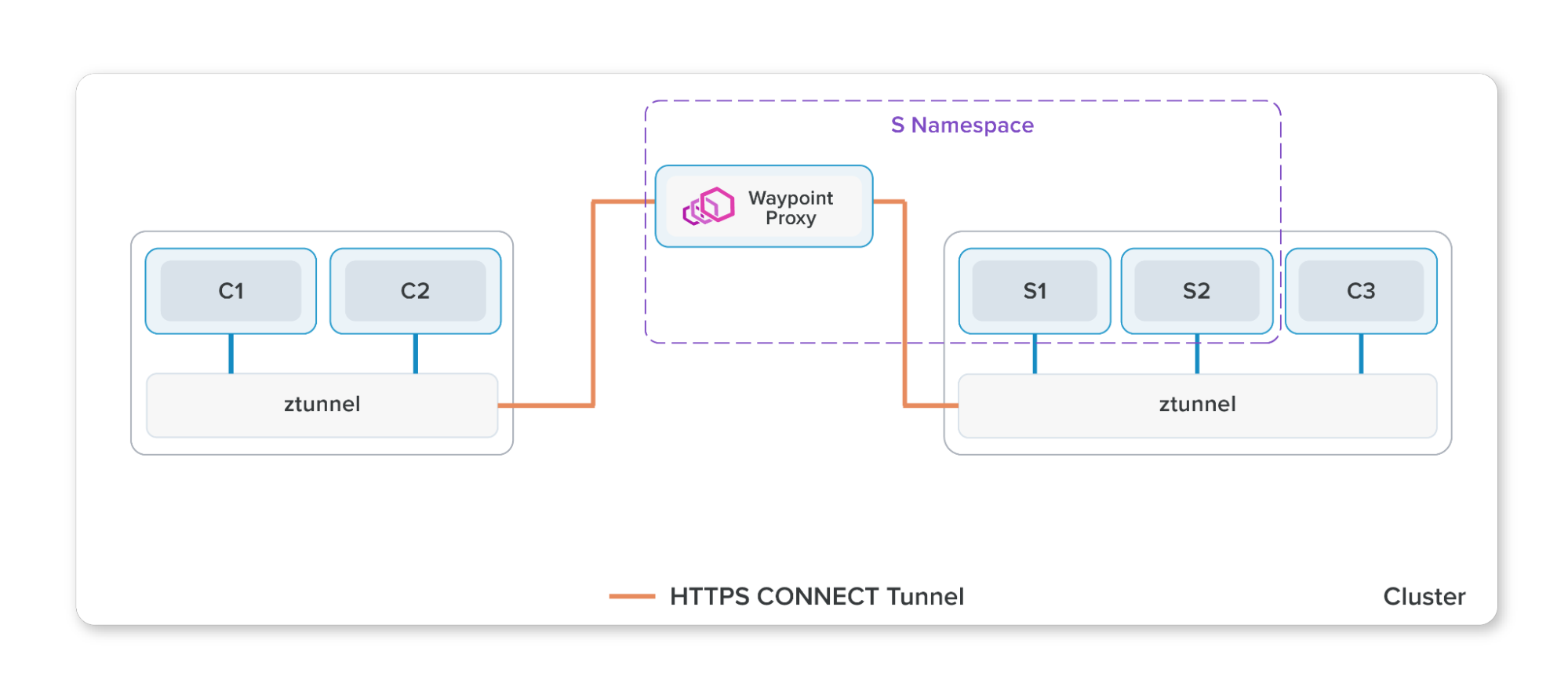
Ambient mode has a different architecture from the traditional Sidecar approach:
- Sidecar mode: An Envoy proxy is attached to every Pod.
- Ambient mode: Composed of ztunnel (one per node, L4 processing) and waypoint (per namespace/service, L7 processing).
We’ll cover the components and operational principles in more detail later in this post.
Advantages of Ambient Mode — Limitations of Sidecar Mode
1. Control Plane Scalability Issues
In Sidecar mode, every sidecar fundamentally needs to know the information of all other destinations in the mesh. When destination configuration changes, it must be propagated to all sidecars simultaneously, so the burden on istiod (control plane) increases steeply as the cluster grows.
In Ambient mode, ztunnel similarly needs to know the entire mesh’s information. But the key point is not simply that the number of propagation targets decreases — it’s that the polynomial scaling problem itself can be solved. In Sidecar mode, where the number of Pods equals the number of proxies, the configuration size to propagate × number of propagation targets grows non-linearly as services increase.
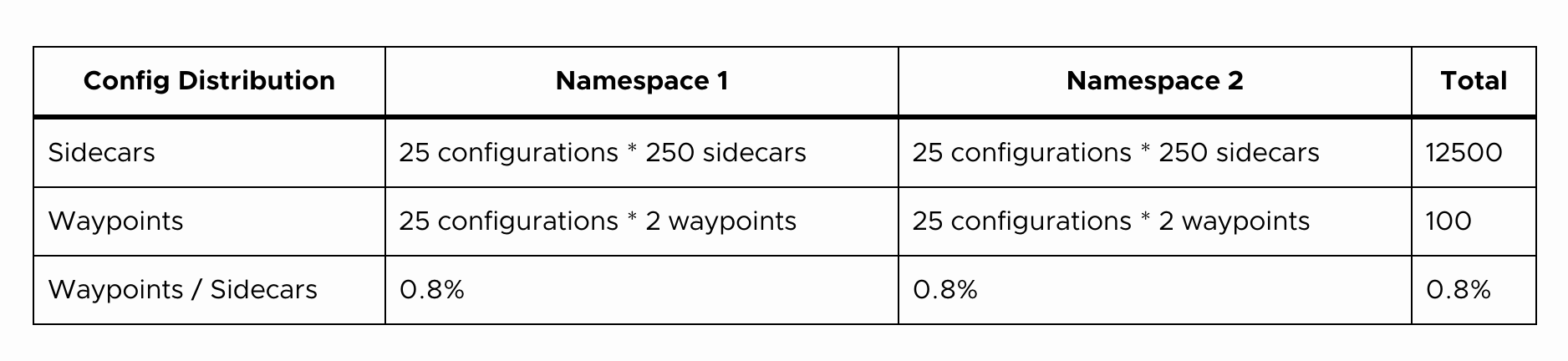
For more details, see the Istio official blog.
2. Data Plane Resource Waste — Envoy Proxy Per Pod
In Sidecar mode, one Envoy proxy is needed per Pod. Our team currently operates approximately 4,000 Pods.
Based on the Istio official documentation, Envoy sidecar and ztunnel resource usage is as follows:
- Sidecar (1,000 RPS): ~0.2 vCPU, 60Mi memory
- Ztunnel (1,000 RPS): ~0.06 vCPU, 12Mi memory
Our measured Envoy resource usage was:
- Idle state: ~0.05~0.01 vCPU, 60Mi memory
- At 2,000 RPS: ~0.8~1.2 vCPU, 300~500Mi memory
If we attached sidecars to all 4,000 Pods, tens to hundreds of vCPUs and approximately 240Gi of memory would be consumed purely by proxies in idle state alone. In Ambient mode, ztunnel exists one per node and waypoint per namespace or service. Of course, as services scale, the number of nodes increases and so does the number of ztunnels, but compared to Sidecar’s 1:1 scaling with Pod count, the resource growth is much more gradual.
3. K8s Gateway API Support; https://gateway-api.sigs.k8s.io/
Today in Kubernetes, updates to the existing Ingress resource are frozen and Gateway API is establishing itself as the new standard. The Istio team was also moving toward adopting Gateway API as the default option, and official documentation began being written around Gateway API.
While Gateway API can be used in Sidecar mode as well, at the time Sidecar mode primarily used Istio APIs (VirtualService, etc.), and since Ambient mode’s official documentation and examples were written from the start with Gateway API in mind, it was natural to adopt them together.
Disadvantages of Ambient Mode
Of course, there are disadvantages as well.
- Expanded blast radius: In Sidecar mode, the proxy shares its lifecycle with the Pod, so the impact of failures is limited to each Pod. In Ambient mode, however, since it depends on ztunnel (node-level) and waypoint (namespace/service-level), failures in these components can affect an entire node or namespace. From another perspective, a SPoF (Single Point of Failure) that didn’t exist in Sidecar mode has been introduced.
- Increased debugging difficulty: New concepts like ztunnel, waypoint, and HBONE need to be learned, and as proxies and hops increase, tracing the root cause of issues becomes more challenging.
- Stability concerns and low maturity: Being just after GA, there were few production-validated cases, and it was less mature compared to Sidecar mode and Istio APIs (e.g., VirtualService).
Honestly, aside from the dramatic resource savings, we think Sidecar mode is better. Yet we still chose Ambient mode.
Team Decision-Making Process
We held Sidecar vs Ambient discussions within the team.
“I want to choose something we won’t need to touch for 2-3 years. I’d rather take the time to think deeply and make a decision.”
“Traffic manipulation and visibility are the key. As long as that works well, Ambient mode is fine. But bugs and stability are a concern.”
“Setting aside the resource aspect, Sidecar seems to have more advantages, but if we’re not going to use many features, Ambient is fine. We should focus on recovery speed rather than incident frequency.”
The key points were these: while Sidecar mode is more mature, considering the continuously growing service scale and infrastructure, we determined that Ambient mode was the right choice for our team across the three aspects discussed above.
We wanted to avoid the situation of adopting Sidecar mode and then having to migrate to Ambient mode later, so we chose Ambient mode while raising our team’s understanding of Istio and Envoy and proceeding carefully with our research.
Components and Operating Principles of Istio Ambient Mode
Having briefly covered the need for a service mesh and why we chose Ambient mode, let’s now look at how Ambient mode actually works. The content below covers the areas our team focused on most intensively during the pre-adoption research phase, and understanding HBONE’s operation and traffic redirection structure in particular proved decisive during later troubleshooting.
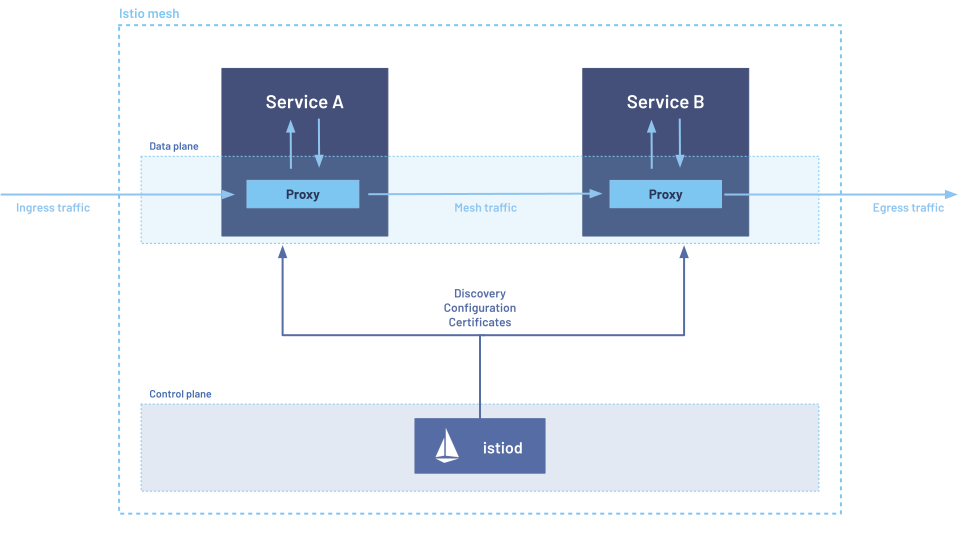
Most service mesh implementations (Istio Sidecar mode, Linkerd, etc.) attach a proxy to each Pod as a sidecar. Istio Ambient mode, on the other hand, places a ztunnel on each Node and only uses waypoint proxies for L7 routing when needed.
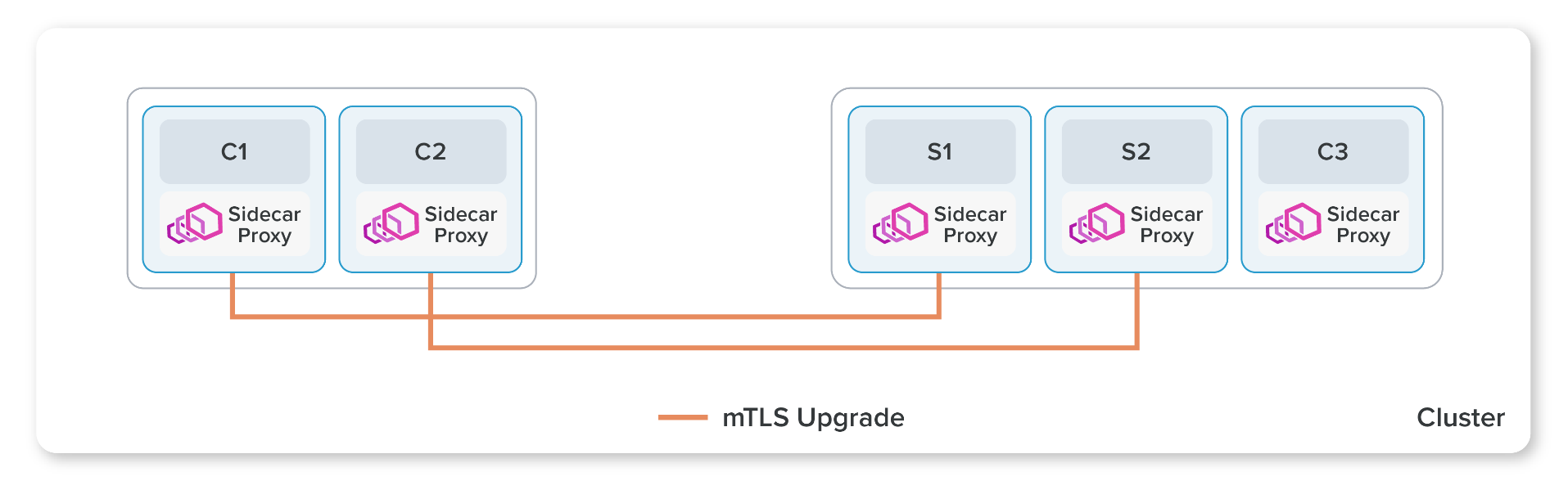
The diagram above shows Istio’s traditional model of deploying Envoy proxies as sidecars.
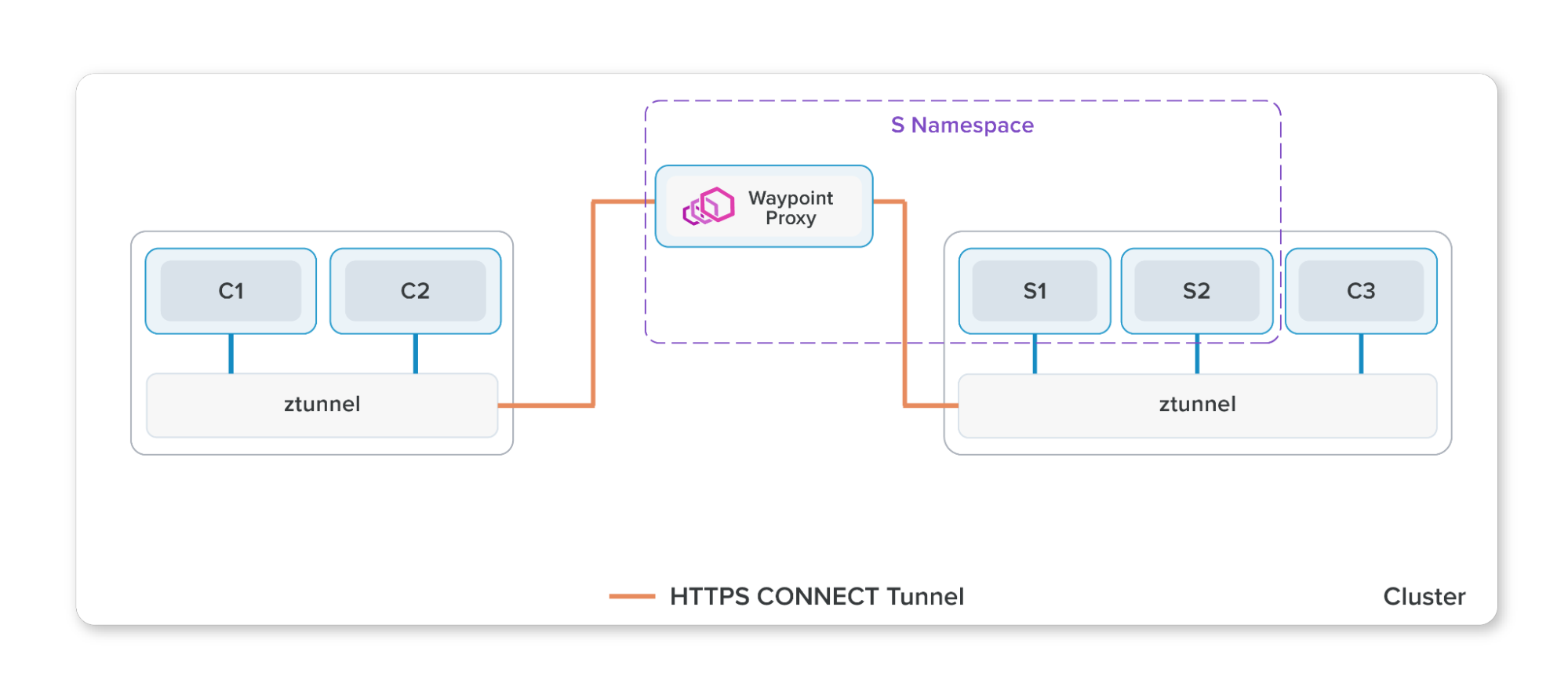
This section aims to convey the components and operating principles of Ambient mode briefly. For more details, refer to the Istio official documentation and Istio GitHub ARCHITECTURE.md.
1. Ambient Mode and Istio Control Plane
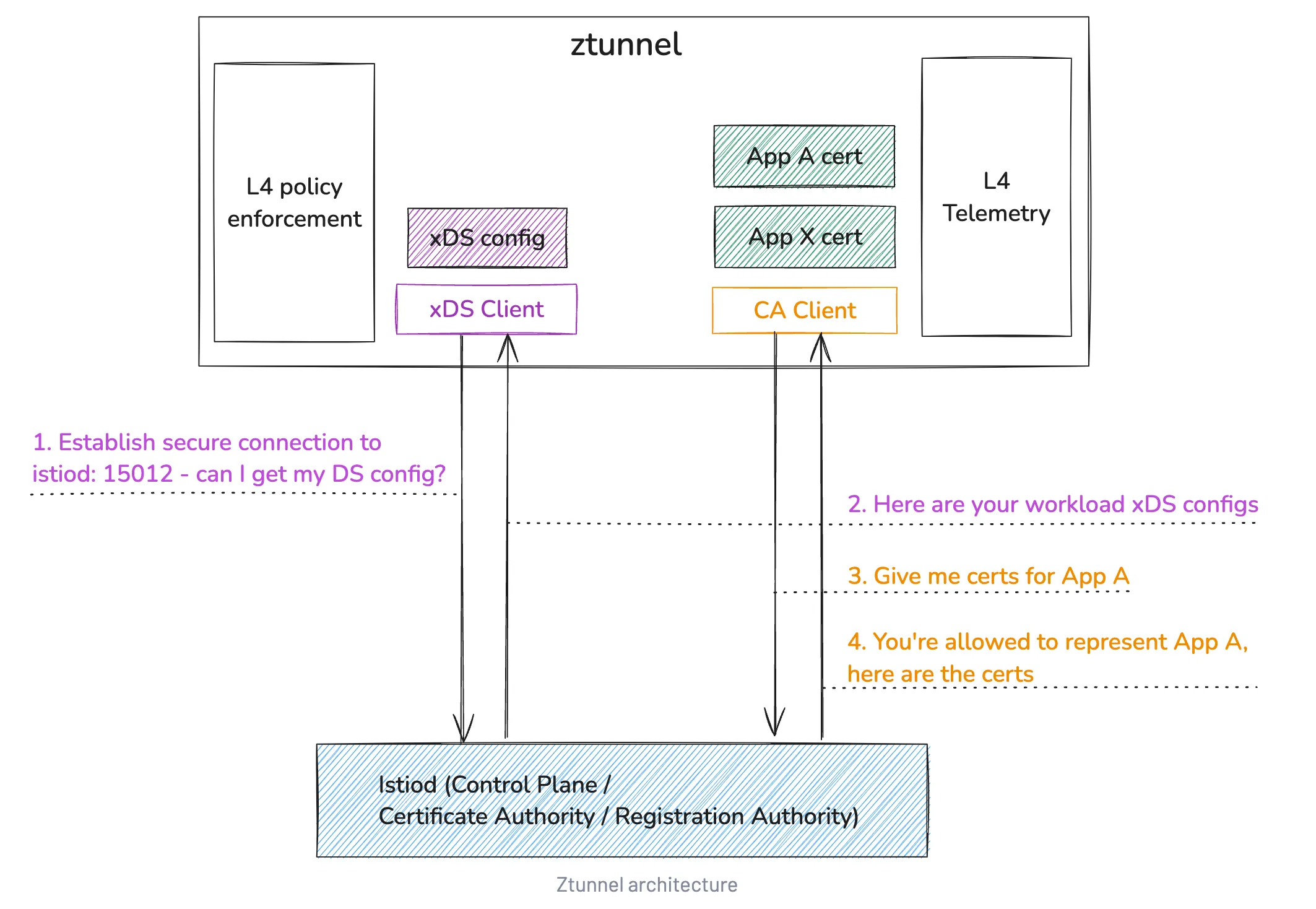
In Istio, the Control Plane (istiod) propagates configuration and policy to the data plane. In Ambient mode, ztunnel and waypoint are data plane components that communicate with istiod via the xDS API to receive cluster state.
- ztunnel communicates with istiod through the xDS API.
- ztunnel receives certificates for inter-service mTLS communication.
The role of propagating configuration to the data plane is no different from Sidecar mode. The difference is that in Sidecar mode the propagation targets are sidecar proxies running per service, while in Ambient mode they are waypoint and ztunnel.
2. Ambient Data Plane
- Ztunnel at L4: one per node, handles mTLS tunnels and basic policy processing
- Waypoint Proxy at L7: selectively deployed per namespace/service, handles sophisticated routing and observability
- Reference: Istio Ambient Data Plane
Workloads in Ambient mode can be broadly divided into 3 categories:
- Not part of the mesh
- Part of the mesh
- Part of the mesh with Waypoint configured
2-1. Not Part of the Mesh
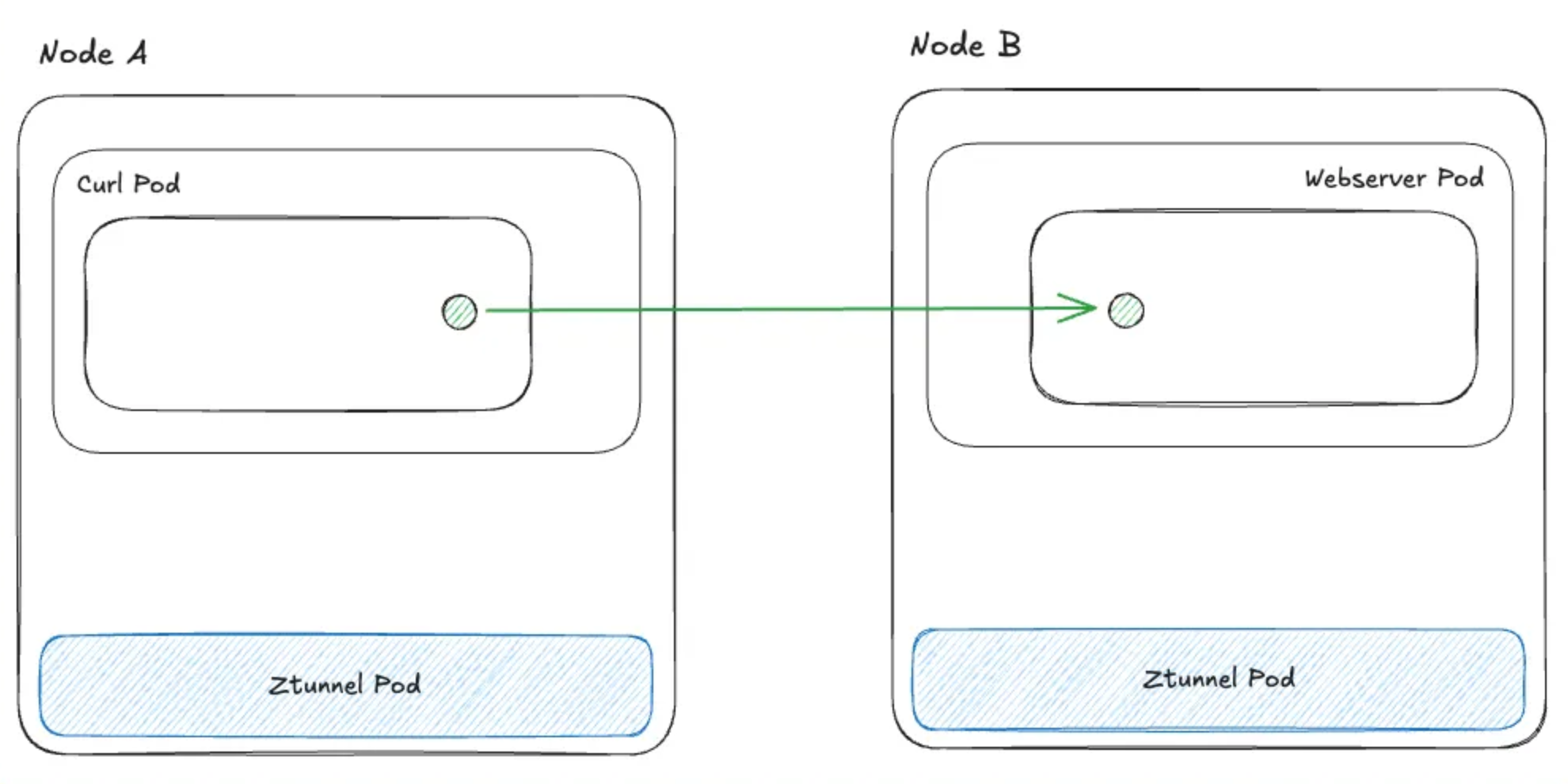
When both Pods are out-of-mesh, it works identically to the existing Kubernetes network (via kube-proxy).
2-2. Part of the Mesh
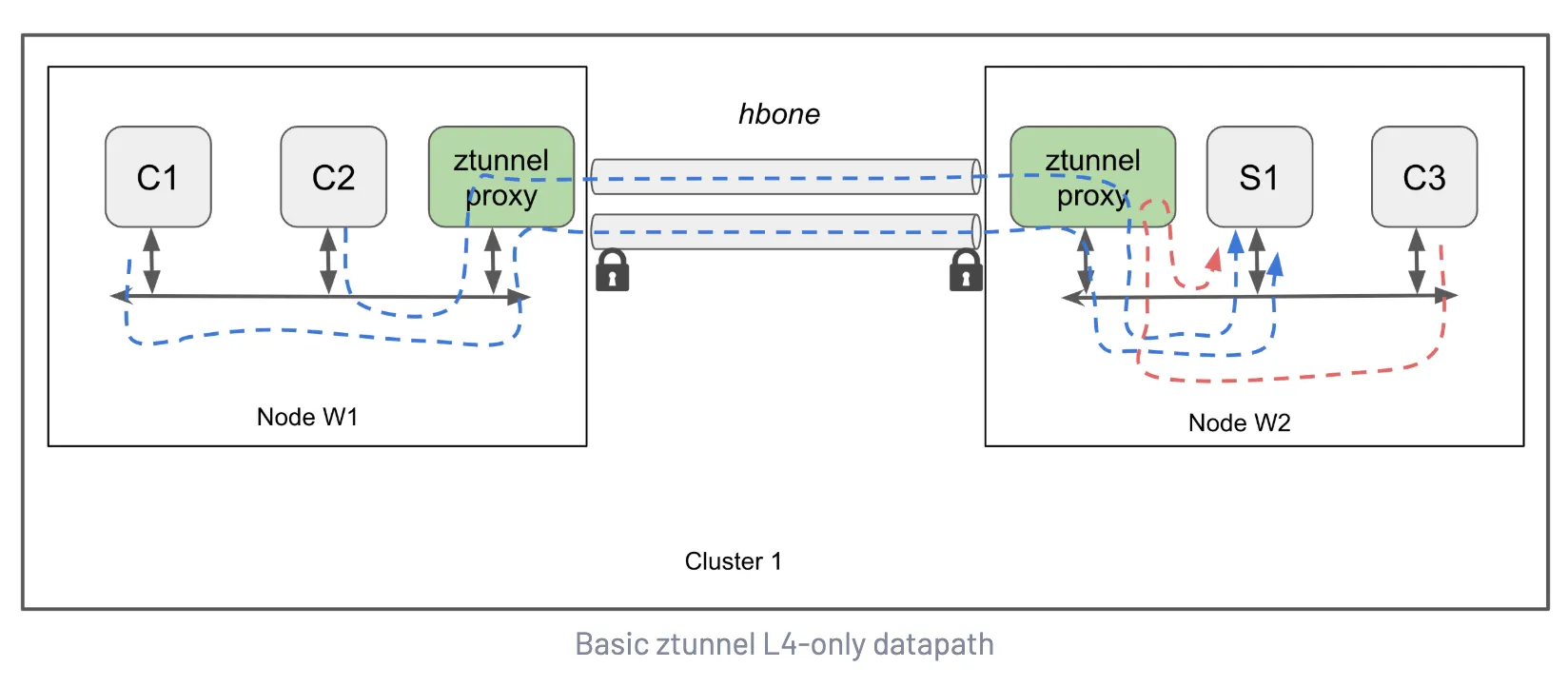
-
Outbound traffic: Traffic leaving a Pod is transparently redirected (https://istio.io/latest/docs/ambient/architecture/traffic-redirection/) to ztunnel and generally sent to Kubernetes
Serviceendpoints. If the destination is part of the mesh, it’s sent through an encrypted HBONE channel. -
Inbound traffic: Incoming traffic also passes through the node’s ztunnel. If it doesn’t violate
AuthorizationPolicy, the request succeeds. Pods can receive either HBONE traffic or plaintext traffic.
Workloads in the Ambient mesh communicate through HBONE, ztunnel, and mTLS via x509 certs. Since mTLS is enforced, both source and destination have unique x509 certs, and ztunnel uses the certificates of the workloads (pods) on its node. During the mTLS process between pods, ztunnel does not use its own identity.
2-3. Part of the Mesh with Waypoint Configured
When waypoint is enabled, all traffic subject to the waypoint’s scope passes through the waypoint, enabling L7 policies (AuthorizationPolicy, RequestAuthentication, WasmPlugin, Telemetry, …) to be applied.
Unlike ztunnel, waypoint proxies don’t necessarily reside on the same node as the source/destination pod.
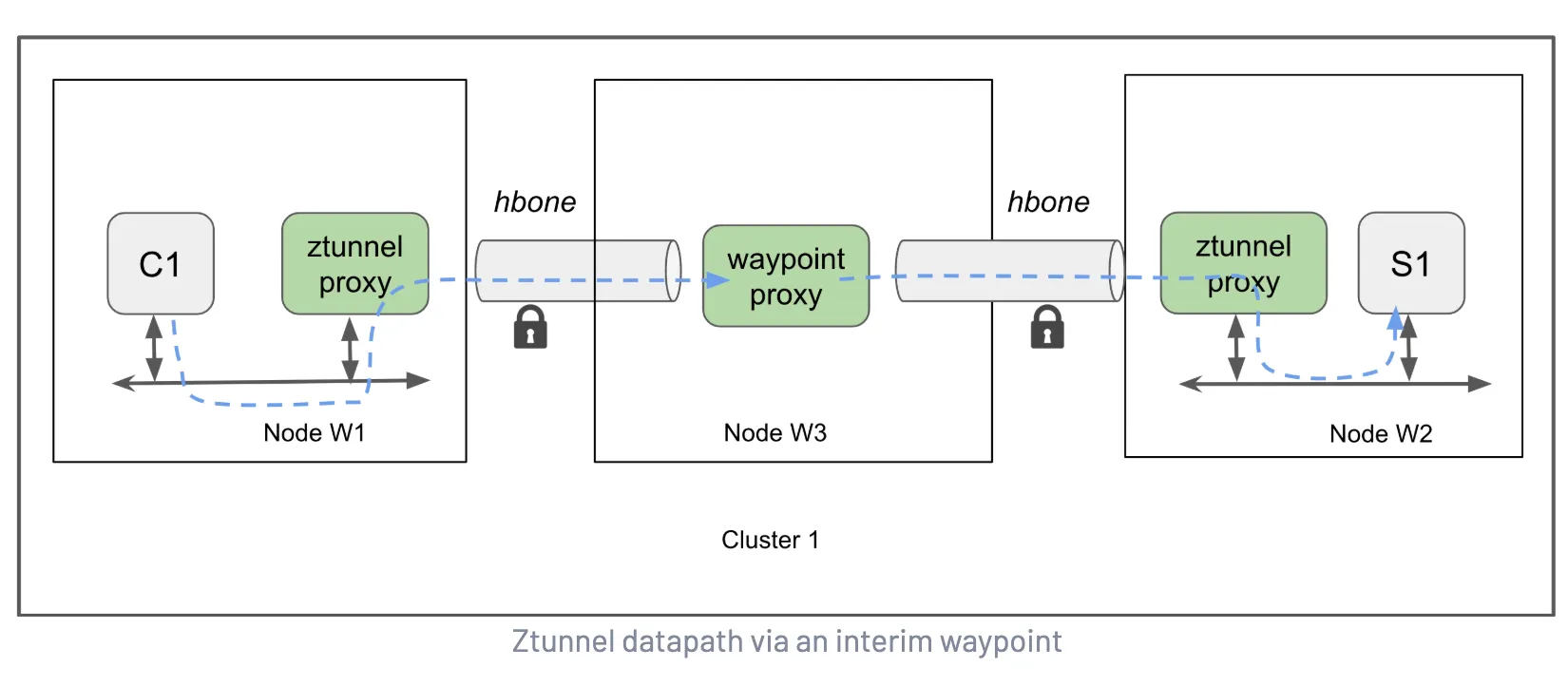
3. HBONE
- HBONE encapsulates L4 payloads using an HTTP/2 CONNECT + mTLS combination.
- In-mesh components including Gateway, Waypoint, and Ztunnel communicate securely via HBONE.
- Reference: Istio HBONE
HBONE (HTTP-Based Overlay Network Environment) is a concept used in Istio, referring to the secure tunneling protocol used for communication between Istio components.
HBONE encompasses 3 standards:
- HTTP/2
- HTTP CONNECT (tunnel connection)
- mTLS
While the name might suggest a complex separate protocol, it’s essentially a combination of existing Envoy features. Opening a tunnel with the HTTP CONNECT method and layering TLS on top — that’s all HBONE is. Think of it as assembling already-proven standards into Envoy config.

In pre-HBONE approaches, traffic content often needed to be modified or specific headers added. Istio would often insert Istio-specific metadata into traffic to manage inter-application communication. But HBONE can perform proxy processing without altering the original state of application traffic at all.
However, this characteristic is a double-edged sword for debugging. When tracking TCP connection reset issues, we captured tcpdump on ztunnel, pod, and waypoint, but the HBONE segments only showed encrypted TLS content. We needed to capture all network interfaces on the destination side to see the traffic decrypted by ztunnel — this process will be covered in detail in Part 3 on troubleshooting.
4. Ztunnel Traffic Redirection
- iptables rules inserted by istio-cni redirect TCP packets from pods to ports 15006/15008/15001.
- Redirection target: Pod → Ztunnel → Waypoint/external, applying service mesh policies without sidecars.
- Reference: Istio Traffic Redirection
traffic redirection: data plane functionality that intercepts traffic sent to and from ambient-enabled workloads, routing it through the ztunnel node proxies that handle the core data path
Just as Sidecar mode intercepts all traffic destined for applications through the sidecar, in Ambient mode all traffic is redirected. The important point here is that if ztunnel is bypassed, all Authorization policies set in the mesh are also ignored.
As shown in the following diagram, ztunnel can receive all traffic from workload pods with the help of istio-cni pods. The istio-cni node agent reacts to CNI events such as pod creation/deletion, modifying the pod’s network rules so traffic can be redirected to the node-local ztunnel. The redirection occurs entirely within the Pod network, not on the host (node) side.
An important point in this architecture is that ztunnel and istio-cni must always be in Running state. If a Pod is scheduled while istio-cni is not yet ready, that Pod may end up partially participating in the mesh. The untaint-controller can be used to prevent this issue, and we’ll cover the details in Part 3.
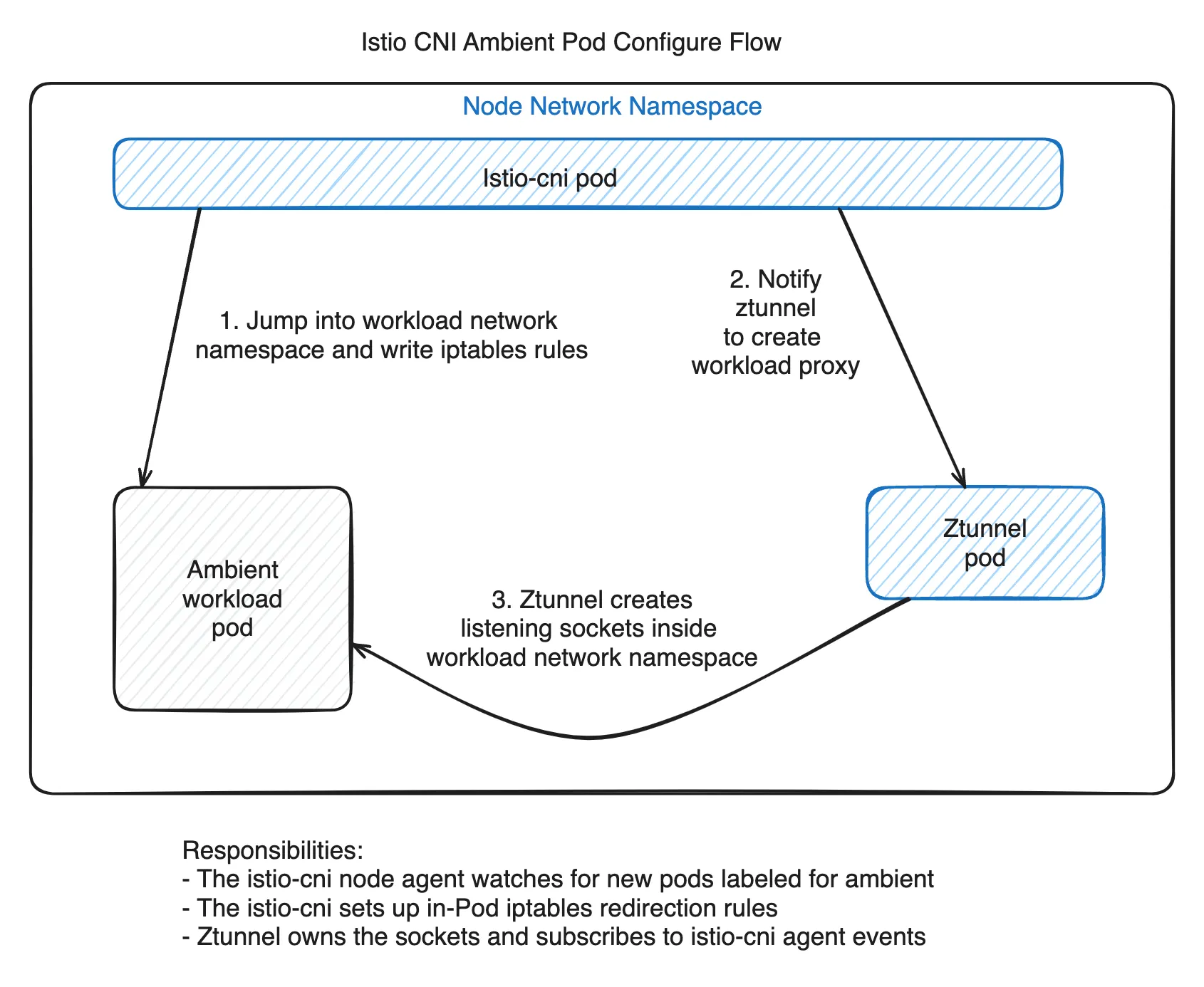
istio-cni doesn’t just modify workload pods — it also notifies ztunnel that it needs to establish connections with new pods.
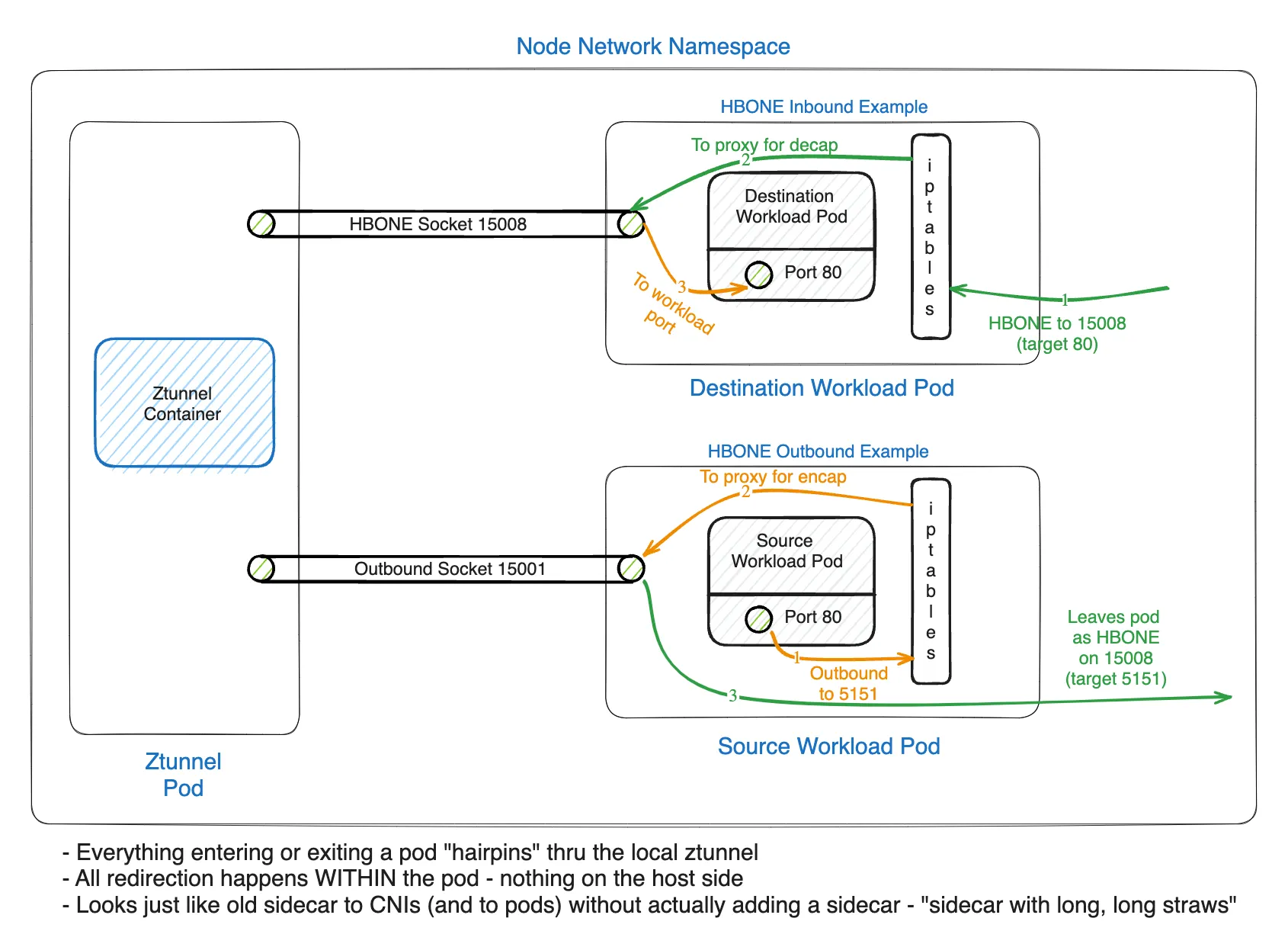
All incoming TCP traffic to a Pod is redirected to ztunnel for ingress processing. If the traffic is plaintext (source port != 15008), it’s redirected to the in-pod ztunnel plaintext source port 15006. If the traffic is HBONE (source port == 15008), it’s redirected to the in-pod ztunnel HBONE listening port 15008. All outgoing TCP traffic from a pod is redirected to ztunnel’s port 15001 for egress processing before being sent by ztunnel using HBONE encapsulation.
One point worth noting here: the official documentation uses the expression “in-pod ztunnel”, but ztunnel is strictly a separate DaemonSet container from the workload pod. Looking at the actual behavior, the rules that istio-cni injects into iptables don’t simply send traffic to the ztunnel container — they REDIRECT to TCP sockets (localhost ports 15001/15006/15008) created within the Pod’s container network namespace. Because these sockets are connected to the node’s ztunnel DaemonSet, the expression “in-pod ztunnel port” is possible. In other words, the actual target of traffic redirection is not the ztunnel container but the sockets inside the Pod connected to ztunnel.
Preview of the Next Post
In this post, we covered the operating principles of Ambient mode at a conceptual level. But as mentioned earlier, the essence of Ambient mode is a collection of Envoy configs. In the next post, we’ll look directly into the Envoy configs of ztunnel and waypoint to examine how the HBONE tunneling and traffic redirection explained in this post are actually implemented.
This is the first post in the Istio Ambient Mode adoption series.
- Part 1: Why Istio Ambient Mode? (this post)
- Part 2: Ambient Mode Under the Hood via Envoy Configs
- Part 3: Surprising Issues and Troubleshooting in Production
Reference
- https://istio.io/latest/blog/2024/ambient-reaches-ga/
- https://istio.io/latest/blog/2023/waypoint-proxy-made-simple
- https://www.cncf.io/blog/2023/04/26/istio-ambient-waypoint-proxy-made-simple/
- https://istio.io/latest/docs/ops/deployment/architecture/
- https://istio.io/v1.28/docs/ambient/architecture/
- https://istio.io/latest/docs/ambient/architecture/data-plane/
- https://istio.io/latest/docs/ambient/architecture/hbone/
- https://istio.io/latest/docs/ambient/architecture/traffic-redirection/