How Channel.io Adopted GitHub Actions Part 2: Operating ARC in Production and Troubleshooting
The original version of this post is available on the Channel.io Tech Blog.
After building our GitHub Actions-based self-hosted runners, everything initially appeared to work smoothly. But as we began actual operations, we ran into issues like CI unexpectedly terminating due to small changes, and docker pull rate limit problems.
In Part 2, we’ll share these troubleshooting cases and optimization efforts, exploring how to operate GitHub Actions-based CI/CD more reliably.
3. Operating the GitHub Actions Runner Cluster
Following Part 1’s 1) About ARC and 2) Running Container Jobs on Self-hosted Runners, this is 3) Operating the GitHub Actions cluster.
After adopting ARC (Actions Runner Controller) to operate GitHub Actions self-hosted runners on Kubernetes, we confirmed that CI/CD pipelines worked correctly for basic use cases.
We expected everything to work seamlessly, but once we started actual operations, there were plenty of issues both large and small. Among them, we’d like to share a few particularly memorable issues and how we resolved them.
3.a Received a shutdown signal... ; Runner Pod Suddenly Terminating Mid-CI
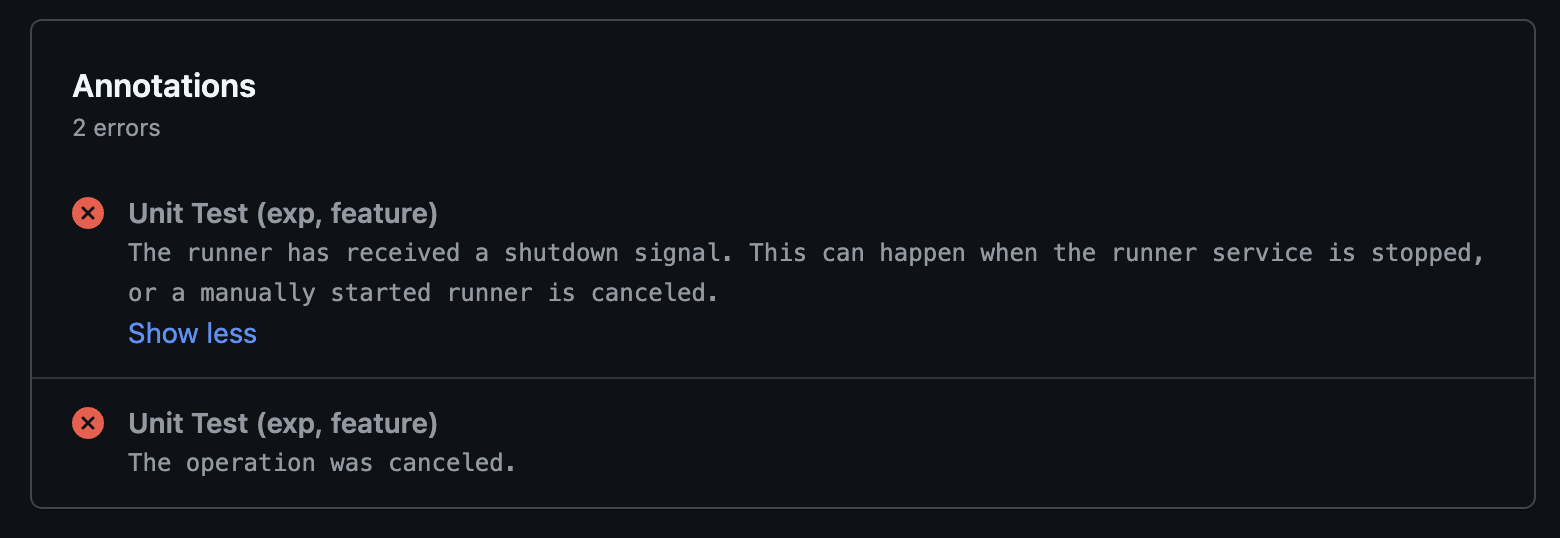
While CI/CD jobs were running in GHA Runner containers, Runner Pods would intermittently disappear, causing CI/CD failures. This problem occurred multiple times per week, and the following error message was left in the GitHub Actions logs.
Analyzing the Root Cause
Runner Pods running CI in Kubernetes have different characteristics from the stateless services we commonly know, like API servers or web applications.
Runners require high CPU/memory usage during builds and tests, and must run stably until a specific Job completes. However, the resource QoS (Quality of Service) Class we initially set for Runner Pods was BestEffort.
What is BestEffort QoS?
When QoS is designated as BestEffort in Kubernetes, there’s a high chance the pod will be the first to be evicted when node resources are insufficient. Related documentation: Configure Quality of Service for Pods
In other words, when resource contention occurred in Kubernetes, Runner Pods running CI/CD could be terminated first. If it were simply a resource contention issue, we could have resolved it by adjusting QoS settings or allocating more resources, but there was another important variable in our CI/CD environment.
It was Karpenter.
What is Karpenter?
Karpenter is a project that helps automatically provision cheaper and more optimized nodes in AWS EKS (or other cloud environments). It immediately adds necessary nodes when new workloads are created and terminates unused nodes to reduce costs.
Our team actively uses Karpenter for cost reduction and resource optimization. Karpenter continuously seeks more cost-efficient nodes and tends to clean up existing nodes.
This meant that even while CI/CD Jobs were running, Karpenter might decide “Found a cheaper instance! The current node is inefficient, let’s get rid of it!” and clean up the node running the Runner Pod, causing CI Jobs to be interrupted.
Solution: Adding the karpenter.sh/do-not-disrupt: true Annotation
The solution to this problem was very straightforward. By leveraging Karpenter’s Disruption Controls, adding the annotation karpenter.sh/do-not-disrupt: true to a Pod prevents Karpenter from disrupting (terminating) the node running that Pod.

3.b NodePool and EC2 Instance Type Optimization
CI pipelines can vary significantly in their resource requirements depending on the type.
Especially during build and test processes, there are many cases that require momentarily high CPU and memory.
- Allocating too few resources risks OOMKilled or CPU Throttling, causing CI failures.
- Conversely, over-allocating resources wastes unnecessary costs.
Therefore, determining appropriate resource allocation and instance types for CI Runners became important.
Solution: Collecting CI Result Metrics
ARC (Actions Runner Controller) provides its own Prometheus Metrics endpoint. (See the official documentation for detailed metric types)
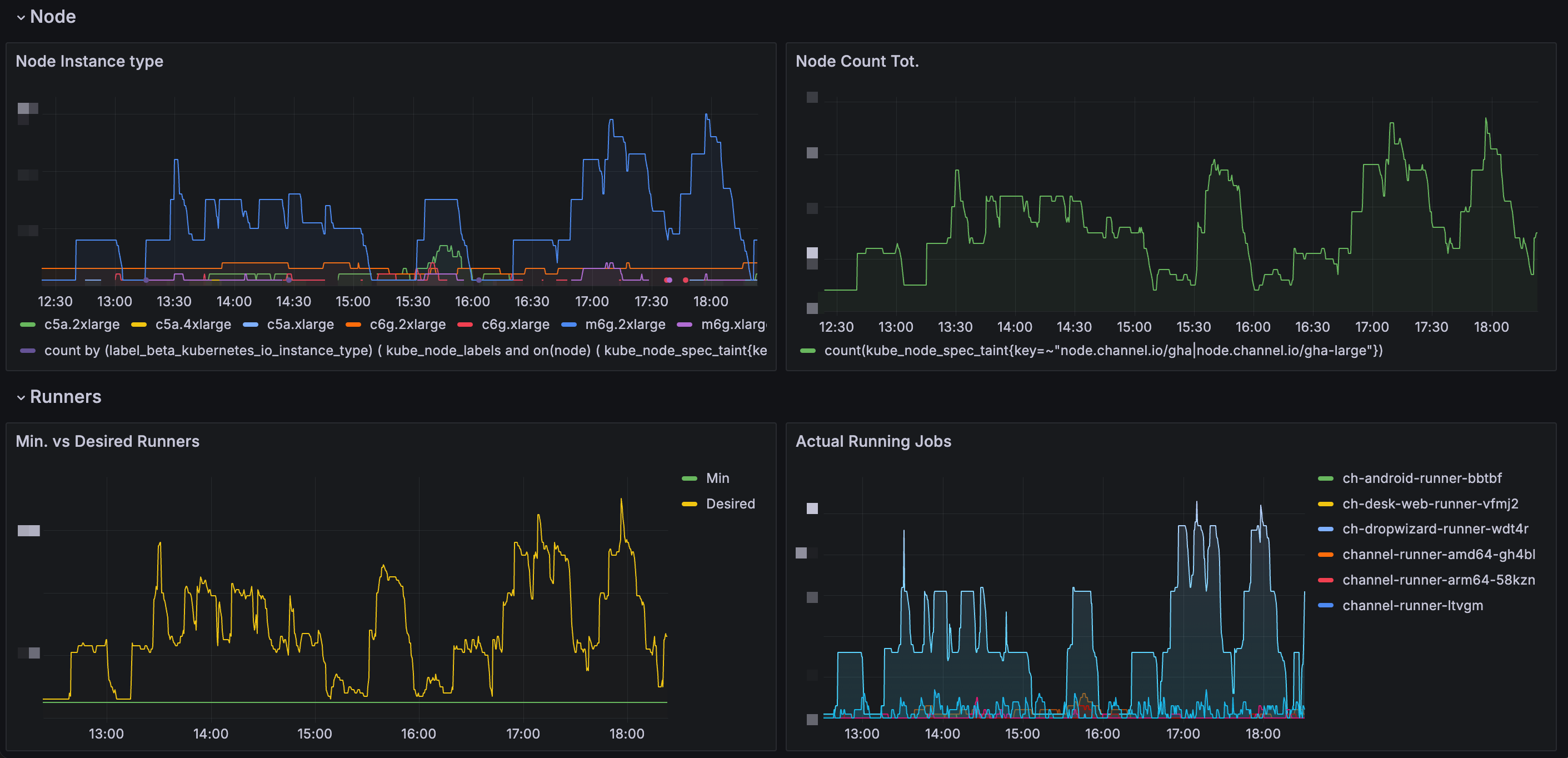
Using this, we analyzed CI Runner execution frequency and resource consumption. Additionally, by combining Karpenter’s node provisioning data, we could determine 1) how frequently each task runs, and 2) how much resources each Runner uses.
Optimizing CI Execution Speed: minRunner Configuration
Creating a new node using Karpenter in Kubernetes takes approximately 1 minute 45 seconds, and initializing a Runner for the first time takes about 15 seconds. With minRunner: 0, there was an issue of having to wait about 2 minutes before CI could start.
However, by configuring a minimum number of runners to be pre-launched for specific Runners (setting minRunner values), we could further improve CI execution speed.
minRunner = 0→ Karpenter provisions a new node when CI starts (~2 min wait)minRunner ≠ 0→ Immediately starts builds using pre-launched Runners (reduced wait time)
Per-Task Runner Optimization
Our team adopted a strategy of operating separate Runners suited to each CI Task. Here are a few examples:
Runner for general builds and tests (channel-runner)
- CI tasks with basic resource usage patterns
- General builds and test execution
App builds supporting Electron and Web (ch-desk-web)
- Requires more CPU resources than channel-runner
- Requires amd64 architecture for specific library builds
Dropwizard-based API server builds (ch-dropwizard-runner)
- JVM-based build environment optimized for specific Java applications
- CPU usage isn’t heavy, but general-purpose or memory-optimized instances are suitable due to high memory usage from long build times
- Typically uses m6g.2xlarge instances
By operating each CI Runner individually, we could adjust CPU, memory usage, and build times for each Runner.
3.c Building a Mirror Registry
This was one of the most troublesome issues during our team’s transition of the CI/CD environment to GHA. It wasn’t a major problem initially, but we experienced CI environment failures during the migration of the main backend server to GHA.
Analyzing the Root Cause
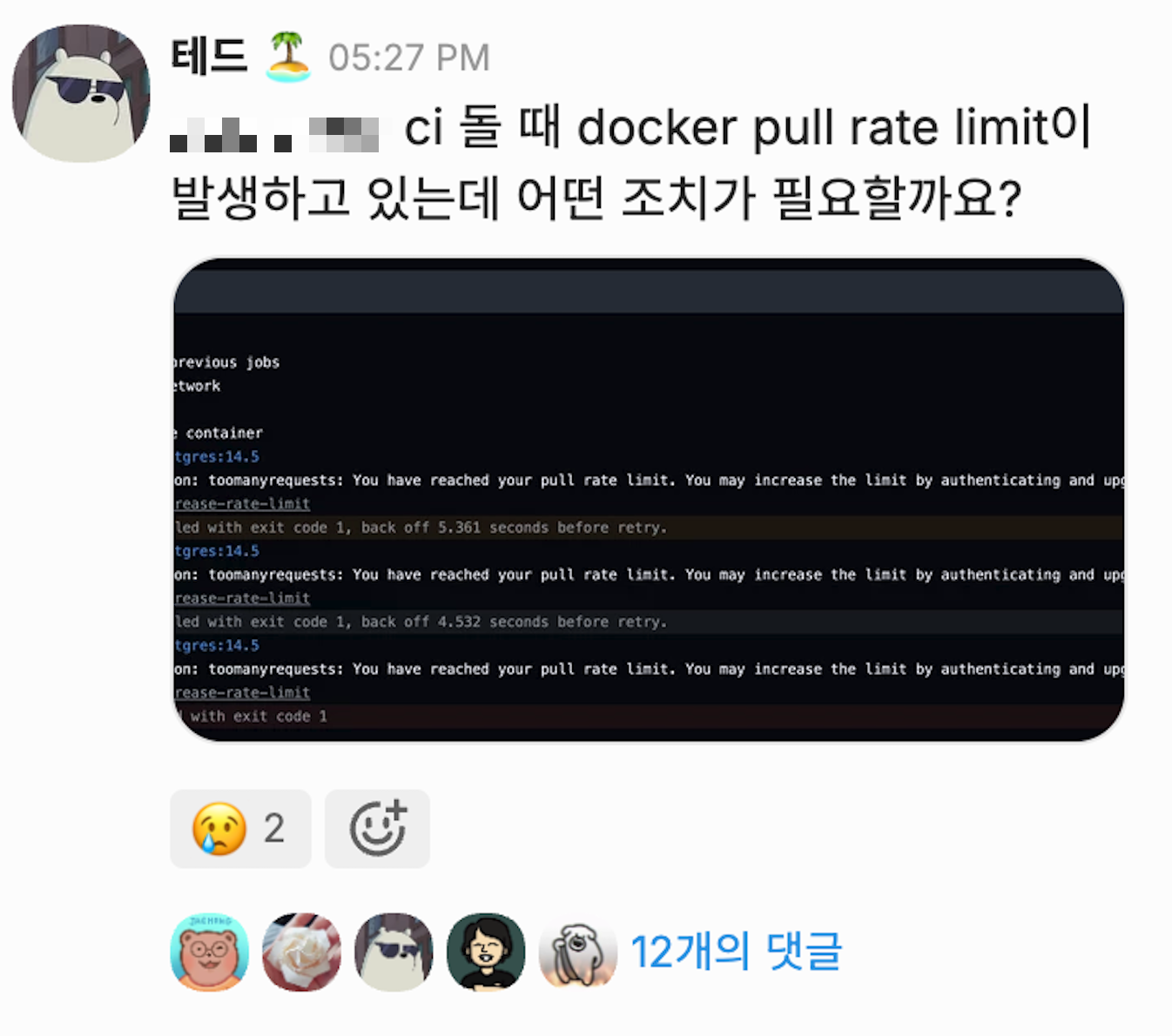
While there were no issues in the existing CircleCI environment, after adopting GHA, CI/CD workflows stopped functioning normally as we hit Docker Hub’s Rate Limit.
1. Docker Hub’s Rate Limit
- Docker Hub limits pull counts on an IP basis for anonymous pull requests.
- GHA Runners located in Private Subnets routed public internet traffic through a NAT Gateway. Since Docker Hub aggregated pull requests under the NAT Gateway’s single IP, we hit the Rate Limit too quickly.
2. Various Service Containers Used in CI
- Including standard Runner Images (
actions-runner,docker:dind), various database and service container images needed during CI — such as PostgreSQL, Redis, LocalStack — were continuously pulled, reaching the pull limit faster than expected.
Short-term Solutions
When the issue occurred, we first considered methods to solve the problem immediately.
1. Changing the NAT Gateway
- Create a new NAT Gateway to assign a new public IP.
- Since Rate Limit is applied on an IP basis, using a new NAT Gateway immediately lifts the restriction.
- However, this was a temporary solution, and continuously changing IPs wasn’t a practical resolution.
2. Switching Docker Hub images to other registries
- Reduce Docker Hub dependency by using mirrors from
public.ecr.aws,ghcr.io(GitHub Container Registry), etc. - All existing CI pipelines would need modification, while also requiring discussion on guidelines to discourage Docker Hub registry usage.
Long-term Solution
While applying short-term solutions, we needed to find a fundamental resolution. We reviewed several approaches and ultimately decided to build our own Mirror Registry.
1. Using ECR Pull Through Cache (not adopted)
ECR provides a Pull Through Cache feature that allows pulling through ECR instead of downloading images directly from Docker Hub.
However, we decided not to adopt it due to the following issues:
- Company-wide CI/CD would need to be forced to pull from AWS ECR URLs instead of Docker Hub.
- When third-party GitHub Actions internally use Docker Hub images, it’s difficult to enforce ECR Pull Through Cache.
- All image addresses specified in existing CI/CD pipelines would need modification, with the burden of enforcing strict adherence to team guidelines.
2. Building our own Mirror Registry (final solution)
Ultimately, we decided to self-host a Docker Registry and configure the Docker Daemon in GHA Runners to preferentially use this Mirror Registry.
Harbor was also mentioned in this process, but if it was only to be used as a mirror registry for GHA, building a full Container Registry with Harbor seemed unnecessary.
Mirror Registry Configuration
Docker Registry fetches and caches images from the Upstream Registry (Docker Hub) on the first pull request. When the same image tag is requested again, it only checks for updates and returns the previously stored image. This minimizes docker pull requests going through the NAT Gateway and enables faster image pulls in the CI/CD environment.
We modified the Docker Daemon settings of the DinD (Docker-in-Docker) container running in GHA Runner Pods to use the Mirror Registry as the default registry, updating the dockerd configuration of the DinD container used in Runner Pods.
Improvements After Implementation
1. Docker Hub Rate Limit Problem Completely Resolved
- Docker Hub requests through the NAT Gateway were drastically reduced.
2. Increased CI/CD Environment Stability
- Even when Docker Hub service is unstable, CI/CD remains stable using the internal Mirror.
3. Docker Image Pull Speed Optimization
- Since the Mirror Registry caches internally using mounted AWS EBS volumes, the number of
docker pullrequest hops is reduced compared to Docker Hub, decreasing pull times.
| Image | Size | Docker Pull (Direct) | Docker Pull w/ Mirror |
|---|---|---|---|
| Postgres | 435MB | 19s | 12.6s |
| Localstack | 1.27GB | 9.3s | 4.75s |
3.d S3-based Caching Over @actions/cache
Efficiently utilizing build caching is an important optimization point when operating CI/CD pipelines. GitHub Actions provides @actions/cache by default — it’s free, has great usability, and is widely used in many projects. However, there were some constraints in our team’s CI/CD environment that made using @actions/cache as-is impractical.
Analyzing the Root Cause
Constraint 1: GitHub Actions Cache Storage Limit (10GB per repository)
- GitHub provides a maximum of 10GB cache storage per repository. However, some of our projects frequently cached 700MB to over 1GB of files per build, causing unwanted Cache Eviction to occur more frequently as CI runs accumulated.
- Especially when multiple projects and services are managed in a single monorepo, each build independently generates large cache files, causing existing caches to be deleted even faster.
Constraint 2: Data Transfer Costs via Public Internet When Using Self-Hosted Runners
- When using GitHub Actions on GitHub-Hosted Runners, integration with
@actions/cacheand GHA Artifacts works smoothly. - However, our team operated Self-Hosted Runners for cost reduction and scalability, which meant all cache file storage and downloads had to go through the Public Internet.
In other words, when Self-hosted runners pull and push data from GitHub Actions Cache Storage, and when uploading files generated during CI jobs to the GitHub Artifact Store, internet-based data transfer costs were incurred — a burden on CI/CD cost optimization.
Solution: Writing Custom Caching Actions Scripts Using S3
Instead of @actions/cache, we decided to use our team’s AWS S3 storage as a caching store.
1. Introducing Composite Action-based Caching
- Defined composite actions as a replacement for GitHub Actions’
@actions/cache - Implemented custom caching logic to upload and download CI caches to/from S3
- name: Gradle cache
  uses: actions/cache@v4 # → channel-io/ch-github-actions/cache@v1
  with:
    path: |
      /root/.gradle/caches
      /root/.gradle/wrapper
    key: ${{ runner.os }}-gradle-${{ hashFiles('**/*.gradle*', '**/gradle-wrapper.properties') }}-${{ github.sha }}
    restore-keys: |
      ${{ runner.os }}-gradle-${{ hashFiles('**/*.gradle*', '**/gradle-wrapper.properties') }}-
      ${{ runner.os }}-gradle-
We observed approximately 3x faster download speeds compared to actions/cache. (On our self-hosted runners, actions/cache peak speed: 105MB/s, channel-io/ch-github-actions/cache peak speed: 320MB/s)
2. Using Only Internal Network Traffic via VPC Endpoint
- By leveraging AWS VPC Endpoints, data can be transferred directly within the AWS internal network (VPC) without going through the Public Internet.
- This simultaneously achieved data transfer cost reduction and network performance improvement.
3. Optimizing S3 API Call Frequency Through File Compression
- Since AWS S3 charges for requests in addition to storage, uploading/downloading individual files each time is inefficient.
- To address this, cache files are compressed into a single file before uploading.
Conclusion
We’ve shared our experience of transitioning and operating CI/CD infrastructure based on GitHub Actions (GHA), discussing the changes we experienced during migration and the direction forward.
Compared to before, there were 1) immediate changes gained from GHA adoption, and at the same time, 2) challenges to solve going forward to further develop the CI/CD environment became clear.
1. Key Changes from GHA Adoption — Cost Reduction and Operational Efficiency
The most noticeable change from transitioning our CI/CD platform from CircleCI to GHA + Self-Hosted Runners was cost reduction. We achieved the effect of reducing overall CI/CD costs to approximately 1/3 of the previous level.
The cost reduction was possible not simply from switching from CircleCI to GHA, but because various detailed optimization efforts were carried out together:
- Leveraging a usage-based billing model through self-hosted runner operations
- Dynamic node provisioning through scalable CI runners with Karpenter
- Additional cost savings through caching optimization (using S3)
2. Challenges Ahead — Scalability and Culture Adoption of CI/CD Operations
As a DevOps team, what’s even more important than optimizing CI/CD infrastructure is ensuring the entire organization can easily utilize it.
In the previous CircleCI environment, the DevOps team wrote and maintained most CI/CD pipelines. However, this structure had clear limitations as the organization grew. Therefore, as mentioned with our expectations for GHA, the current goal is to propagate and extend CI/CD roles and responsibilities to product team developers.
To achieve this, we need to focus on two directions:
-
Ensuring CI/CD Infrastructure Stability
- Must operate reliably so product teams can use CI/CD smoothly.
- Kubernetes-based self-hosted Runner maintenance, optimization, and monitoring remain important ongoing tasks.
-
Establishing CI/CD Best Practices and Onboarding
- Documenting CI/CD onboarding and best practices
- Developing Composite Actions that product team developers can easily use
- Continuous improvement and feedback integration so CI/CD culture takes root across the entire organization
Closing Thoughts
Through this GHA adoption and optimization, we achieved tangible results in cost reduction and performance improvement, but we believe the more important goal going forward is extending the role and utilization of CI/CD across the entire organization.
Channel’s DevOps team doesn’t stop at operating infrastructure — we serve the role of helping the entire team leverage better development environments. We will continue to build stronger and more reliable CI/CD pipelines and strive to enable all developers to actively utilize them.
Thank you for reading!
CHANNEL DEVTALK 2025
On June 26th, we presented on this topic at the CHANNEL DEVTALK 2025 online tech meetup. You can watch the presentation below.