How Channel.io Adopted GitHub Actions Part 1: Building ARC and Supporting Container Jobs
The original version of this post is available on the Channel.io Tech Blog.
Hi, I’m Jetty (Jaehong Jung), a DevOps engineer at Channel.io.
In this post, I’ll talk about how Channel.io migrated from CircleCI to GitHub Actions (GHA) and the ARC (Actions Runner Controller) cluster operated by the DevOps team.
Why Did We Move from CircleCI to GHA?
Channel.io had been using CircleCI as our core CI/CD pipeline tool. However, starting from Q2 of last year, we began a PoC (Proof of Concept) to migrate to GHA.
Key Motivations for Considering GHA
- While considering GitHub Enterprise Plan
- At the time, Channel.io’s code repositories were managed on GitHub, and during the process of considering GitHub Enterprise Plan, we wondered — what if we could run CI/CD within the GitHub ecosystem as well?
- Since GHA has excellent compatibility with GitHub, it had the advantage of being usable almost like a GitHub extension.
- Frequent CircleCI outages
- While CircleCI provides powerful features, it occasionally experienced service outages.
- The problem was that when these outages occurred, the entire company’s CI/CD pipeline would come to a complete halt.
- Of course, GHA isn’t free from outages either, but if it’s a GitHub-level issue, it likely wouldn’t be limited to just CI/CD problems, and the response priority would be higher.
What We Expected from GHA Adoption
Changing a CI/CD platform carries meaning beyond a simple tool change. We expected the following benefits from this transition:
- Improved developer experience
- GHA is well-documented and widely used by developers worldwide, so we expected it would lower the barrier for product team developers when writing CI/CD scripts.
- Additionally, thanks to various Marketplace Actions (a plugin-like concept in GitHub Actions), features could be leveraged quickly without building them from scratch.
- Cost reduction and speed improvement
- CI/CD execution costs were also an important factor.
- Operating self-hosted runners could further reduce costs of running CI/CD in cloud environments.
- Within our AWS infrastructure and Kubernetes environment, accessing image registries and caches via in-cluster networking became possible, allowing us to reduce network latency and optimize cache and build speeds.
- Enhanced stability and security
- With existing SaaS-based CI/CD platforms, there weren’t many ways we could directly respond when outages occurred. But by operating self-hosted runners, we could take ownership of CI/CD infrastructure operations.
- We could speed up problem resolution during incidents and immediately scale or adjust infrastructure when needed.
- From a security perspective, operating our own Runner infrastructure allowed us to apply internal security policies more specifically.
How Did We Proceed with GHA Adoption?
When we decided to adopt GHA, we aimed not to simply convert existing CircleCI scripts to GHA, but to improve our CI/CD infrastructure by operating a self-hosted runner cluster. We’ll cover the various technical considerations we faced and the problems we solved in detail in subsequent posts.
Part 1 – Environment Setup: Building ARC and Supporting Container Jobs
Part 1 describes the process of setting up an environment to operate self-hosted runners on a Kubernetes cluster. Let’s look step by step at how our chosen GHA + Kubernetes combination was built.
Configuration overview
- Operating a self-hosted runner cluster using ARC
- How Runners execute on Kubernetes and their scaling logic
- Considerations for running Container Jobs: Docker-in-Docker (DinD), Kaniko, etc.
Part 2 – Operations and Troubleshooting
The most important aspect of applying GHA to our infrastructure was stable operations. We documented the issues that arose during continuous operation of self-hosted runners and how we resolved them.
Key troubleshooting items
- Resolving the “Shutdown signal received…” issue where Runners would stop unexpectedly
- Selecting appropriate nodepool EC2 instance types
- Introducing a mirror registry to solve Docker pull rate limits
- AWS S3 actions as a replacement for
@actions/cacheto improve cache efficiency
Part 1 covers building and optimizing the CI/CD infrastructure,
Part 2 will focus on the problems encountered during operations and how we solved them.
1. About ARC
What Is ARC?
Actions Runner Controller (ARC) is an open-source Kubernetes Operator officially provided by the GitHub Actions team. ARC supports automatically managing self-hosted runners in Kubernetes environments and operating them in a scalable manner.
“Actions Runner Controller (ARC) is a Kubernetes operator that orchestrates and scales self-hosted runners for GitHub Actions.”
Our team currently operates various services on Kubernetes and manages infrastructure through numerous Kubernetes Operators. On top of this environment, we needed to figure out how to operate GitHub Actions self-hosted runners in a scalable way, and ARC was the most suitable solution to meet these needs.
How ARC Works
ARC’s operation can be found in detail in the official documentation, but to understand the overall operation, we can break it down into three major stages.
Step 1: Installation
ARC is deployed to a Kubernetes cluster using Helm.
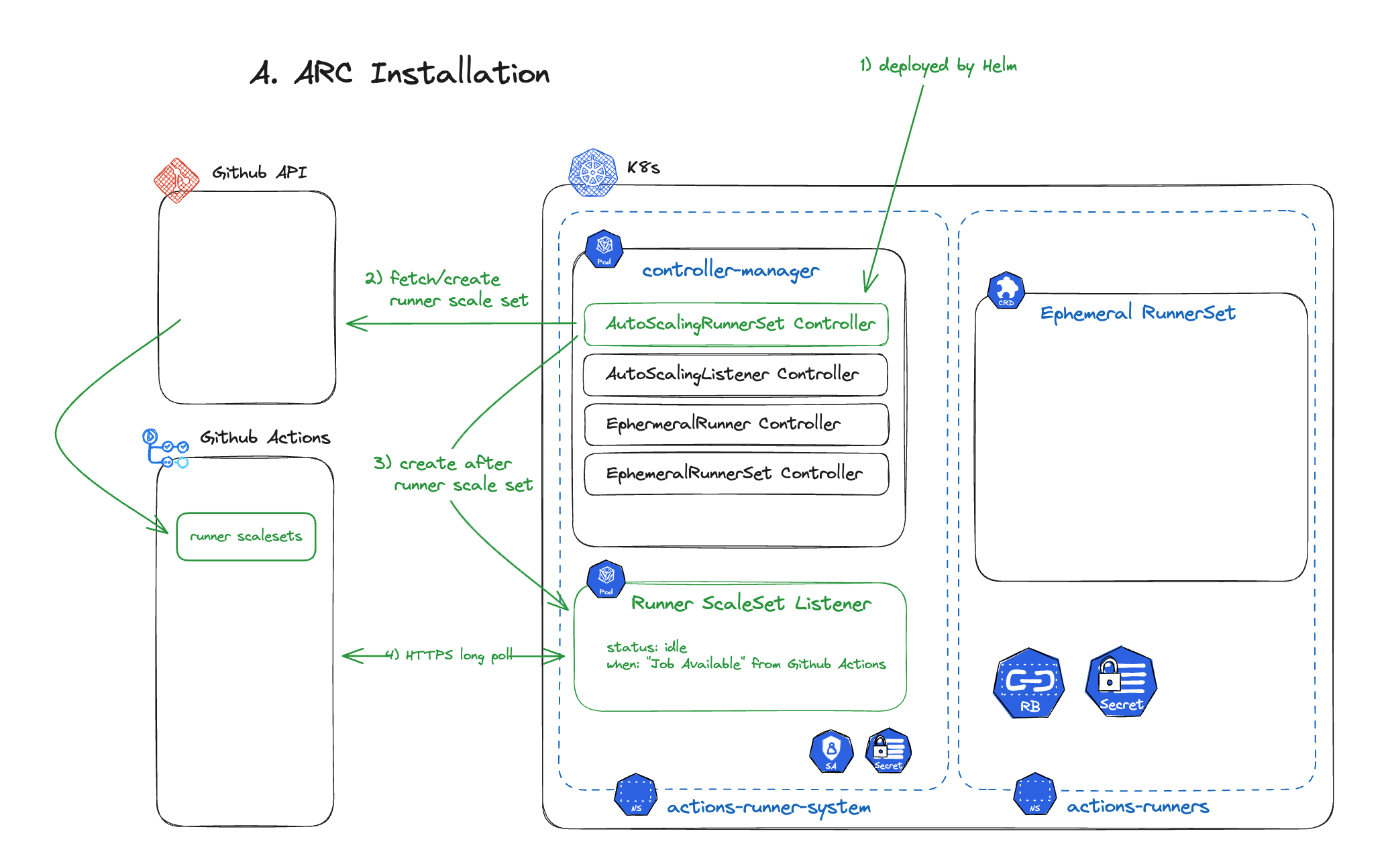
- ARC separates the roles and responsibilities of the
RunnerSet(which performs the actual CI) and theController(which manages it). - ARC interacts with the GitHub API to query or create runner scale sets and manages them within Kubernetes.
- Users can define runner behavior using Kubernetes CRDs (Custom Resource Definitions).
Step 2: Workflow Trigger
The second stage is the process that occurs when a GitHub Actions Workflow is executed.
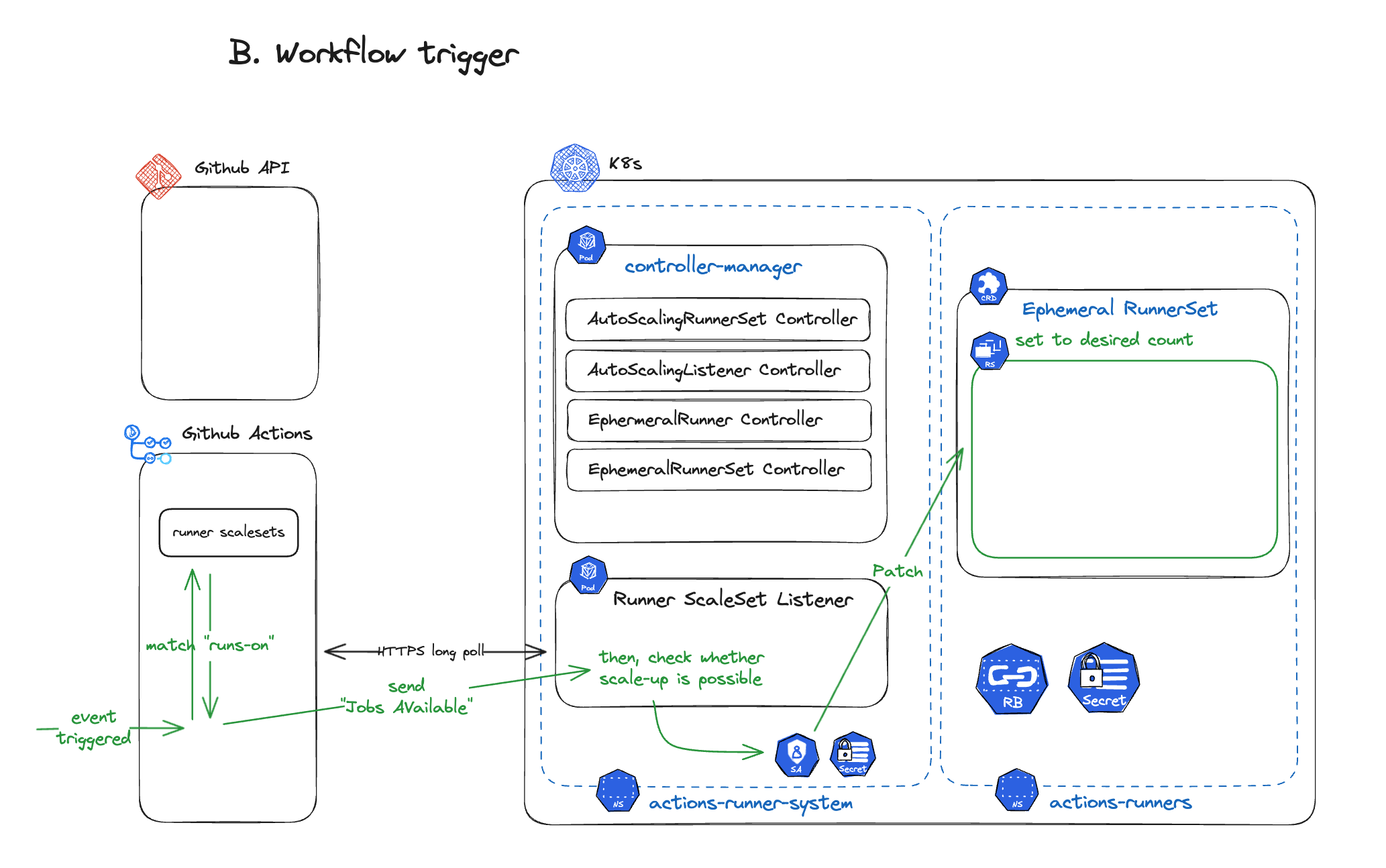
- When a workflow is triggered in GitHub Actions, ARC checks the execution environment.
- If the
runs-oncondition requires a self-hosted runner, ARC’sRunner ScaleSet Listenerdetects jobs waiting to be executed in GitHub Actions. - ARC compares the number of currently active runners with the number of jobs to determine if additional runners are needed.
- If necessary, the Ephemeral RunnerSet’s
replicasare patched to create new runner pods.
Step 3: Runner Pod Creation
In the third stage, actual runner pods are created and registered with GitHub Actions.
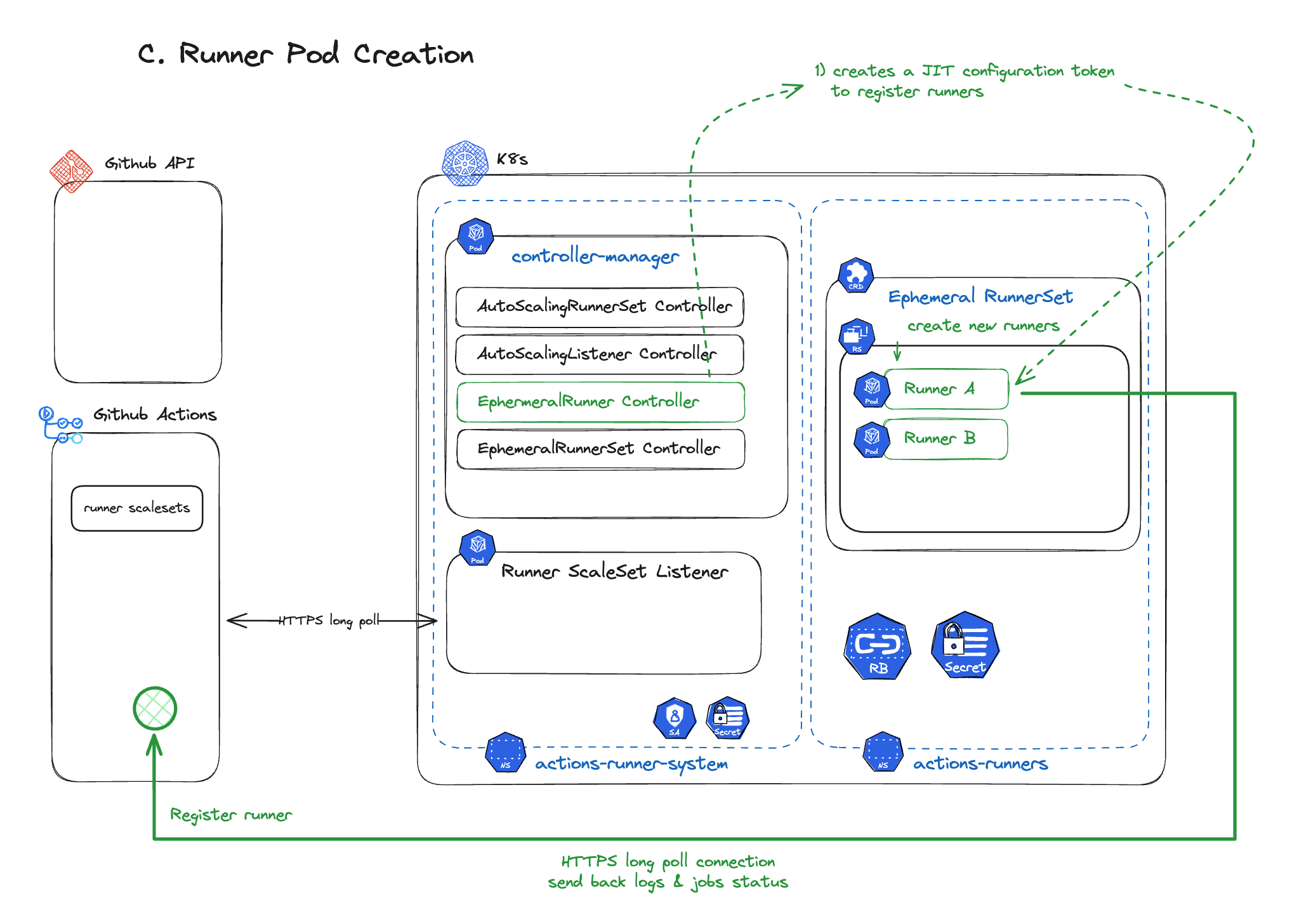
- When ARC determines that a new runner needs to be created, it creates a new runner pod within the Ephemeral RunnerSet.
- The runner signals through the GitHub API that it’s ready to process work. After processing a GitHub Actions workflow job, the runner is automatically deleted when done.
- Active runners maintain an HTTPS long poll with GitHub Actions, continuously transmitting logs and status.
- After a job ends, cleanup is performed automatically.
ARC Installation and Access Token Setup
ARC can be easily installed using a Helm Chart, and a few essential GitHub Access Token configurations are required.
- For Private Repositories: Access Token with
reposcope required - For Public Repositories:
public_reposcope included - For Organization-level Runner usage:
admin:orgscope included
Important note: ARC stores Access Tokens as Kubernetes Secrets. When using PATs (Personal Access Tokens), a system is needed for 1) access control of those Secrets and 2) automating GitHub Token expiration management and Secret Rotation. Alternatively, using GitHub App authentication eliminates the need for a separate token rotation mechanism.
Basic ARC Installation and Operation Testing
Installation and basic operation testing proceeded smoothly without major difficulties.
- Deploying ARC with Helm registered runners without issues, and we confirmed that runners were automatically provisioned when GitHub Actions workflows were executed.
- Scale-out and scale-in policies worked normally, and it was possible to increase or decrease runners as needed through
minRunnersandmaxRunnerssettings.
However…
Running Container Jobs like docker build on Self-Hosted Runners required additional consideration. While basic runner scaling worked well, considerations like running containers inside containers (docker-in-docker, DinD) existed.
Therefore, in the next section, we’ll cover the problem-solving process for running Container Jobs on Self-Hosted Runners!
2. Running Container Jobs on Self-Hosted Runners
ARC used in GitHub Actions is a Kubernetes Operator, where each Runner runs as a Kubernetes container (pod). Because of this, there are no issues with running general Git commands or Shell Commands, but there are some constraints when running Container Jobs using Docker.
So when trying to run a Job that includes a Docker execution step like the following,
jobs:
  build:
    runs-on: self-hosted
    steps:
      - name: Check Docker Version
        run: docker version
a docker: command not found error occurs.
Solution: Methods for Running Containers Inside Containers
There are several ways to run containers inside containers, but two main approaches can be considered.
1. Docker-in-Docker Approach
DinD (Docker-in-Docker) runs a Docker Daemon inside a container, and GitHub Actions ARC provides a containerMode: "dind" option for easy setup.
Considerations when using DinD
- With DinD, a Docker Daemon runs as a sidecar inside the Pod, allowing direct use of Docker commands.
- However, DinD requires the
privilegedoption which needs root access to devices, making it a non-recommended approach from a security standpoint.- The official Docker documentation also states that caution is needed when using privileged mode.
2. Using Alternative Build Tools Like Kaniko
Kaniko is a tool made by Google that allows building Container Images without Root (Privileged) permissions. It’s specifically designed to work well inside containers or Kubernetes environments. Nevertheless, our team decided not to use Kaniko.
Why we didn’t adopt Kaniko
- The team had already accumulated significant experience with Docker-based builds and cache operations.
- There was the burden of modifying and verifying all existing Dockerfiles and CI/CD scripts to fit Kaniko’s build environment.
- Since access control exists at the Kubernetes cluster level itself, we determined that even though Privileged permissions are needed, it wasn’t a major vulnerability for the time being.
While Kaniko research was conducted, we decided not to adopt it as the resource expenditure would be too high relative to the benefits Kaniko could provide.
Practical Application: GitHub Actions Helm values.yaml Configuration
ARC allows specifying containerMode through values.yaml configuration during Helm installation.
ghaRunner:
  image:
    repository: ghcr.io/actions/actions-runner
    tag: latest

  containerMode:
    type: dind

  runnerScaleSet:
    minRunners: 1
    maxRunners: 10
Setting containerMode: "dind" as shown above automatically deploys Runners with privileged mode applied, providing an environment where Docker commands can be executed.
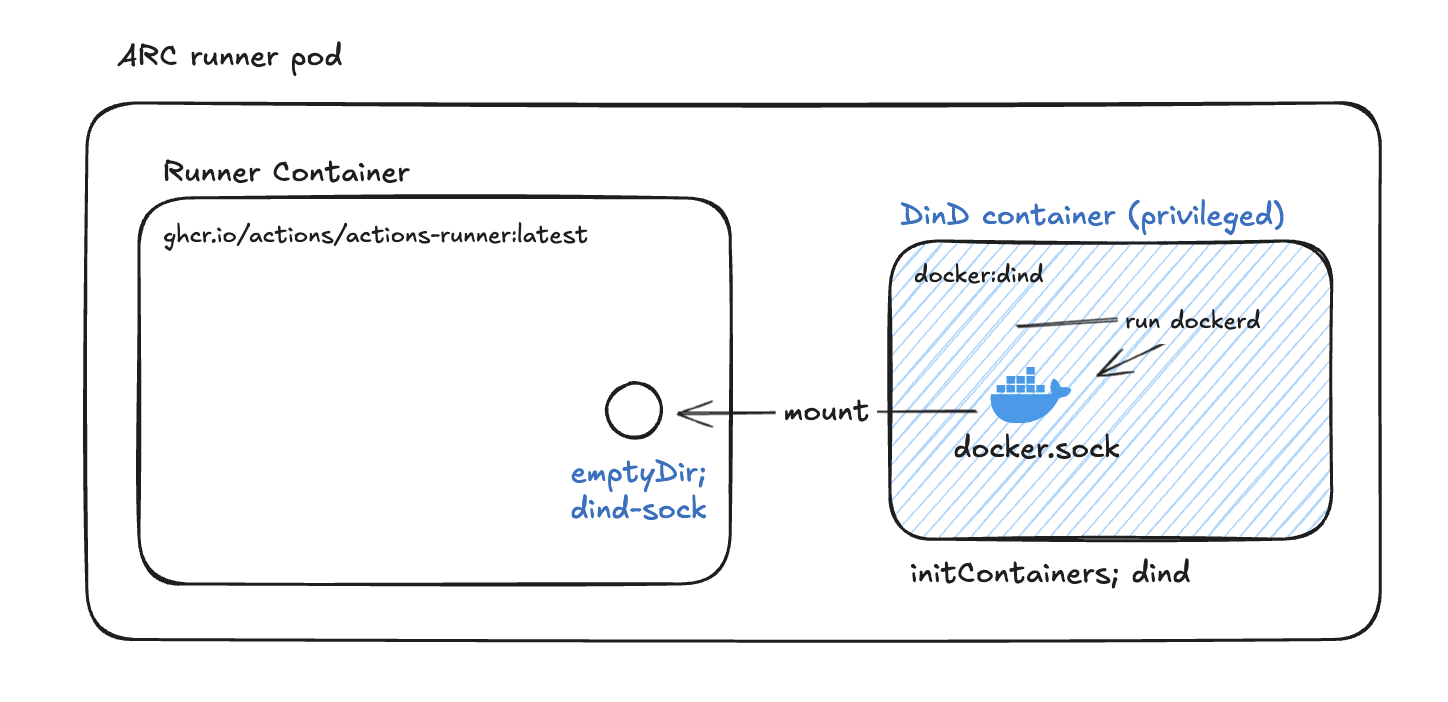
Furthermore, there’s also a method to directly specify templates without using the containerMode value to further customize the Docker Daemon settings inside the Runner — we’ll cover this in more detail in Part 2!
Wrapping Up Part 1
We’ve now looked at the process of building an environment to operate GitHub Actions self-hosted runners on Kubernetes. We configured CI/CD infrastructure to be flexible and scalable using ARC (Actions Runner Controller), and discussed various considerations for running Container Jobs (Docker-in-Docker, Kaniko, etc.).
The basic infrastructure is now set up, but various unexpected problems arise during actual operations. In Part 2, we’ll cover troubleshooting cases encountered during operations and share what solutions we applied to create a more stable CI/CD environment.
Continued in Part 2, where we’ll cover operations and optimization in real usecases!